Track "Consent to Application" Events Using Microsoft Graph PowerShell
Granting consent to applications in Microsoft 365 can have significant security implications. It's important to monitor who grants consent and to which applications. Using Microsoft Graph PowerShell, you can easily query audit logs to track "Consent to application" events under the "ApplicationManagement" category.
In this article, we'll walk you through a script, explain how it works, suggest further enhancements, outline common use cases, identify possible errors and their solutions, and conclude with key insights.
Script: Query "Consent to Application" Events
# Connect to Microsoft Graph
Connect-MgGraph -Scopes AuditLog.Read.All

# Define the filter
$filter = "activityDisplayName eq 'Consent to application' and category eq 'ApplicationManagement'"

# Fetch the audit logs
$logs = Get-MgAuditLogDirectoryAudit -All `
-Filter $filter `
-Property activityDateTime, activityDisplayName, initiatedBy, result, targetResources

# Parse and output the results
$logs | ForEach-Object {
    # Look for the ServicePrincipal (consented app)
    $servicePrincipal = ($_.targetResources | Where-Object { $_.type -eq 'ServicePrincipal' })
    $appDisplayName = $servicePrincipal.displayName

    [PSCustomObject]@{
        "Event Time"                      = $_.activityDateTime
        "Target Application"              = $appDisplayName
        "Permission Granted By (Initiator UPN)" = $_.initiatedBy.user.userPrincipalName
        "Result Status"                   = $_.result
    }
} | Format-Table -AutoSize
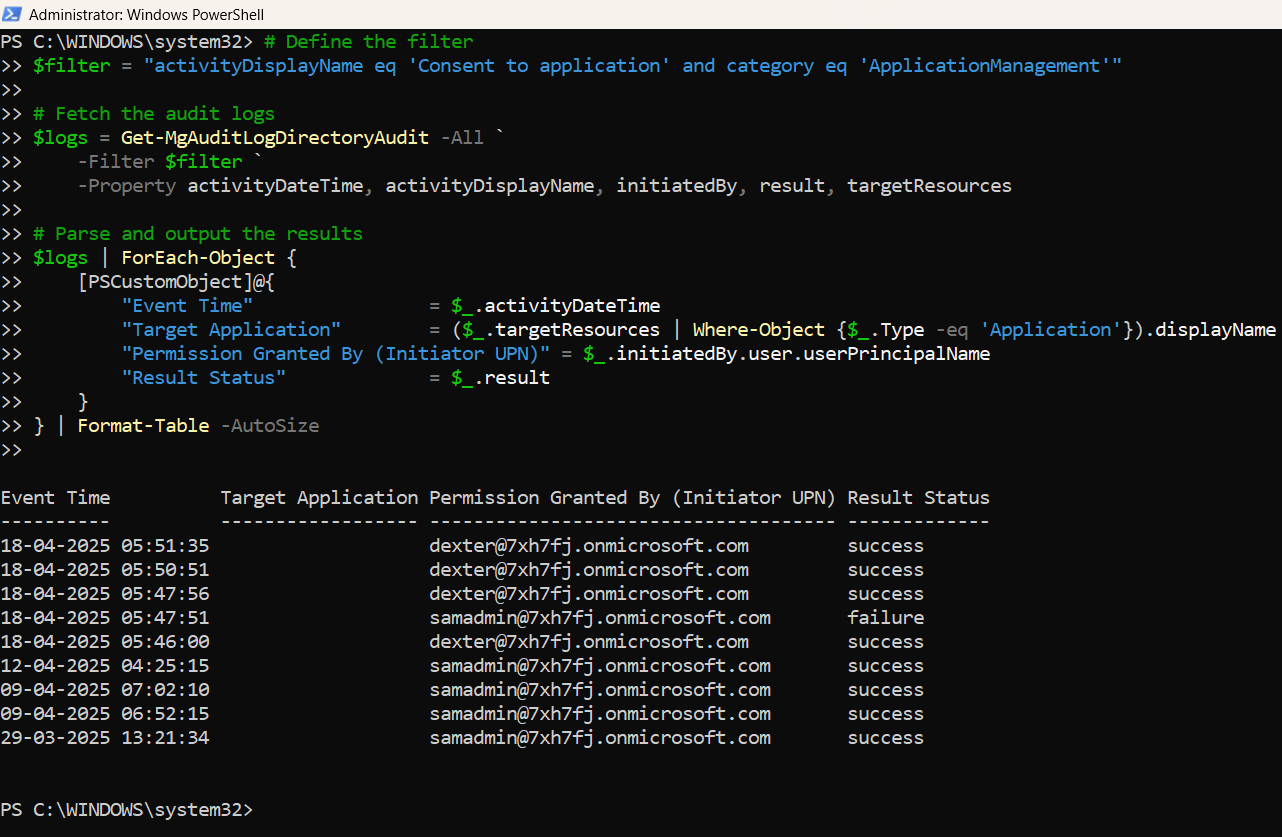
How the Script Works
- Authentication: The script connects to Microsoft Graph using the AuditLog.Read.All permission.
- Filtering Events: It defines a filter that specifically targets:
- activityDisplayName as "Consent to application"
- category as "ApplicationManagement"
- Retrieving Audit Logs: The script uses Get-MgAuditLogDirectoryAudit to fetch all events matching the filter, focusing on necessary properties.
- Processing Results:
- It identifies the ServicePrincipal within the targetResources array.
- Extracts the displayName from the ServicePrincipal, which is the consented application's name.
- Captures the event time, initiator's UPN, and result status.
- Displaying Output: Results are formatted into a clean table for easy console viewing.
Further Enhancements
- Export to CSV: Output results to a CSV file for archiving and reporting.
- Date Range Filter: Add a date filter to limit the results to a specific timeframe.
- Automated Alerts: Send an email alert if consent is granted to a high-risk application.
- Application Sensitivity Tagging: Highlight consent granted to applications considered sensitive.
- Scheduled Execution: Run the script periodically using a scheduled task.
Use Cases
- Security Auditing: Monitor and review who consents to third-party or internal applications.
- Compliance Reporting: Ensure consent activities are documented for compliance audits.
- Risk Management: Quickly identify potential high-risk application consents.
- Incident Response: Investigate who authorized an application during a security event.
Possible Errors & Solutions
| Error | Cause | Solution |
| Insufficient privileges to complete the operation. | Missing AuditLog.Read.All permissions. | Ensure the account has the correct permissions and has consented them. |
| No audit records found. | No consents recorded or filter mismatch. | Broaden the search window or validate that consents occurred. |
| Connect-MgGraph : Access token validation failure. | Session expired or wrong context. | Reconnect to Graph with Connect-MgGraph. |
| Target resources array is empty. | No ServicePrincipal found for the event. | Implement a fallback mechanism for missing targetResources. |
Conclusion
Monitoring "Consent to application" events is critical for protecting your Microsoft 365 environment from potential risks associated with unapproved applications. This Microsoft Graph PowerShell script provides an accurate and reliable way to stay informed about consent activities by specifically targeting ServicePrincipal records.
With enhancements like automated alerts and CSV exports, this script can evolve into a powerful tool for ongoing security monitoring, compliance management, and incident response. Staying vigilant about application consents helps strengthen your organization's security posture significantly.