Microsoft 365 License Audit Report with PowerShell
Generate User-Level and SKU-Level License Reports
Managing Microsoft 365 licenses without visibility leads to: i) Over-licensing, ii) Underutilization, iii) Unlicensed users, iv) Wasted subscription capacity. Instead of manually checking licenses in the admin center, this guide shows how to generate a tenant-wide license audit report using Microsoft Graph PowerShell.
This script:
- ✔ Retrieves all subscribed SKUs
- ✔ Calculates total, consumed, and available units
- ✔ Lists every user and their assigned licenses
- ✔ Identifies unlicensed users
- ✔ Exports 3 structured CSV reports
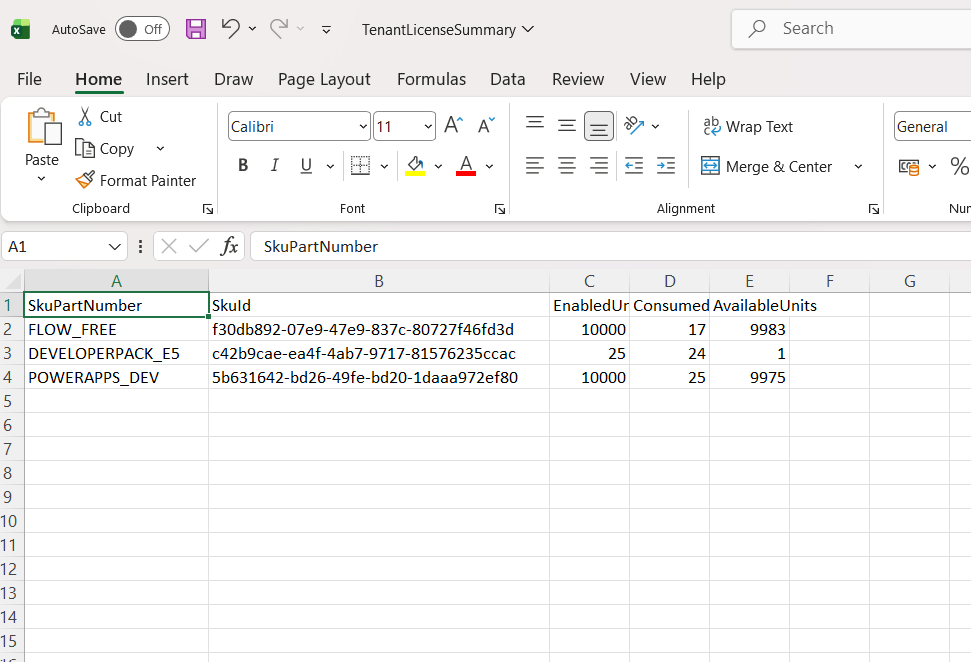
The script dynamically detects licenses in your tenant, including examples such as: FLOW_FREE, DEVELOPERPACK_E5, POWERAPPS_DEV.
🚀 Community Edition Released!
Try the M365Corner Microsoft 365 Reporting Tool — your DIY pack with 20+ out-of-the-box M365 reports for Users, Groups, and Teams.
I) The Script
# Connect to Microsoft Graph
Connect-MgGraph -Scopes User.Read.All, Organization.Read.All

Write-Host "Fetching tenant license information..." -ForegroundColor Cyan

# Get all subscribed SKUs
$SubscribedSkus = Get-MgSubscribedSku

# Create SKU lookup table (SkuId → SkuPartNumber)
$SkuLookup = @{}
foreach ($Sku in $SubscribedSkus) {
    $SkuLookup[$Sku.SkuId] = $Sku.SkuPartNumber
}

# License Summary Report
$LicenseSummary = foreach ($Sku in $SubscribedSkus) {
    [PSCustomObject]@{
        SkuPartNumber  = $Sku.SkuPartNumber
        SkuId          = $Sku.SkuId
        EnabledUnits   = $Sku.PrepaidUnits.Enabled
        ConsumedUnits  = $Sku.ConsumedUnits
        AvailableUnits = ($Sku.PrepaidUnits.Enabled - $Sku.ConsumedUnits)
    }
}

Write-Host "Fetching all users..." -ForegroundColor Cyan

# Get all users with assigned licenses
$Users = Get-MgUser -All -Property Id,UserPrincipalName,DisplayName,AssignedLicenses,AccountEnabled

$UserLicenseReport = @()
$UnlicensedUsers = @()

foreach ($User in $Users) {

    if (-not $User.AssignedLicenses) {

        $UnlicensedUsers += [PSCustomObject]@{
            UserPrincipalName = $User.UserPrincipalName
            DisplayName       = $User.DisplayName
            AccountEnabled    = $User.AccountEnabled
        }

        continue
    }

    foreach ($AssignedLicense in $User.AssignedLicenses) {

        $UserLicenseReport += [PSCustomObject]@{
            UserPrincipalName = $User.UserPrincipalName
            DisplayName       = $User.DisplayName
            AccountEnabled    = $User.AccountEnabled
            SkuPartNumber     = $SkuLookup[$AssignedLicense.SkuId]
            SkuId             = $AssignedLicense.SkuId
        }
    }
}

# Export Reports
$BasePath = "C:\Path\"

$LicenseSummary | Export-Csv "$BasePath\TenantLicenseSummary.csv" -NoTypeInformation
$UserLicenseReport | Export-Csv "$BasePath\UserLicenseDetails.csv" -NoTypeInformation
$UnlicensedUsers | Export-Csv "$BasePath\UnlicensedUsers.csv" -NoTypeInformation

Write-Host "License audit reports exported successfully." -ForegroundColor Green
II) How the Script Works
- Connect to Microsoft Graph
- User.Read.All
- Organization.Read.All
- Global Administrator
- License Administrator
- Reports Reader (read-only scenarios)
- Retrieve All Tenant SKUs
- SkuPartNumber
- SkuId
- Enabled Units
- Consumed Units
- Calculate Available Units
- Remaining capacity
- Risk of license exhaustion
- Overconsumption issues
- Retrieve All Users
- AssignedLicenses
- AccountEnabled
- DisplayName
- Generate 3 Separate Reports
- SkuPartNumber
- Total Units
- Consumed Units
- Available Units
- Each user
- Each assigned license
- AccountEnabled status
- Users without any assigned license
- AccountEnabled state
- Onboarding validation
- Governance checks
- Cleanup exercises
Connect-MgGraph -Scopes User.Read.All, Organization.Read.AllRequired:
Minimum role required:
Get-MgSubscribedSkuThis pulls:
The script dynamically builds a lookup table to translate SkuId → readable SkuPartNumber.
AvailableUnits = ($Sku.PrepaidUnits.Enabled - $Sku.ConsumedUnits)This shows:
Get-MgUser -AllWe retrieve:
TenantLicenseSummary.csv
Shows:
Ideal for capacity planning.
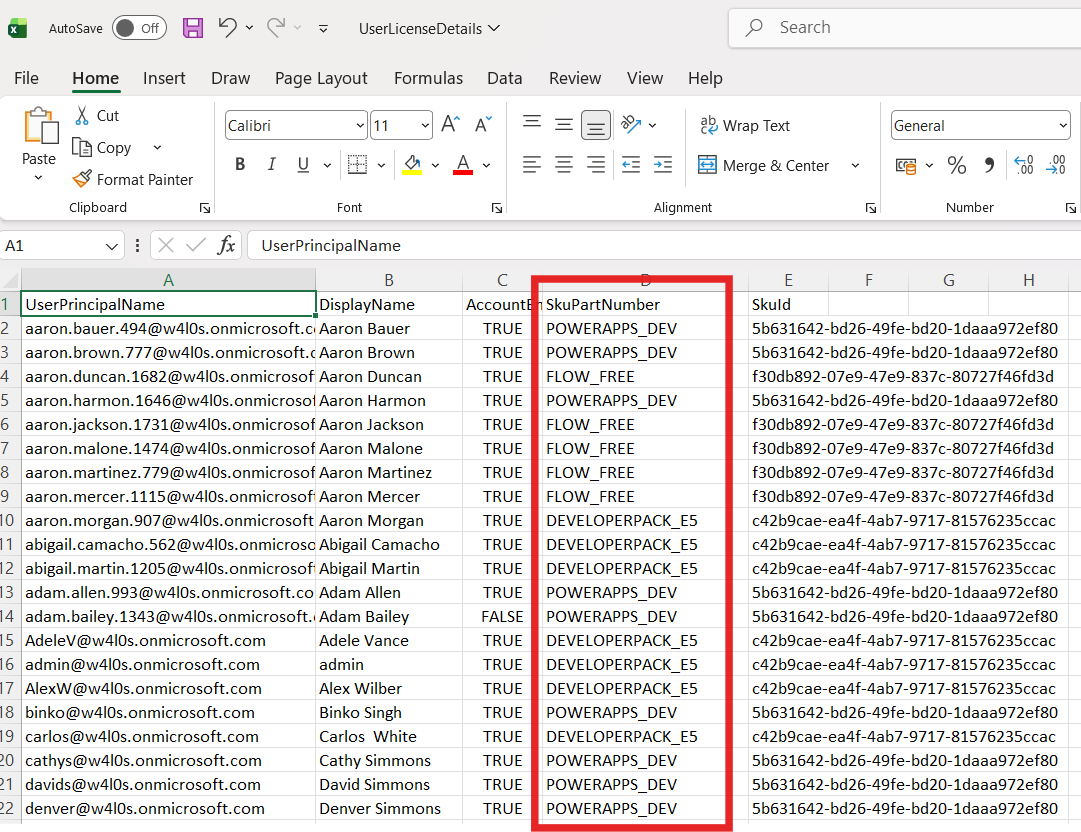
UserLicenseDetails.csv
Shows:
One row per license per user.
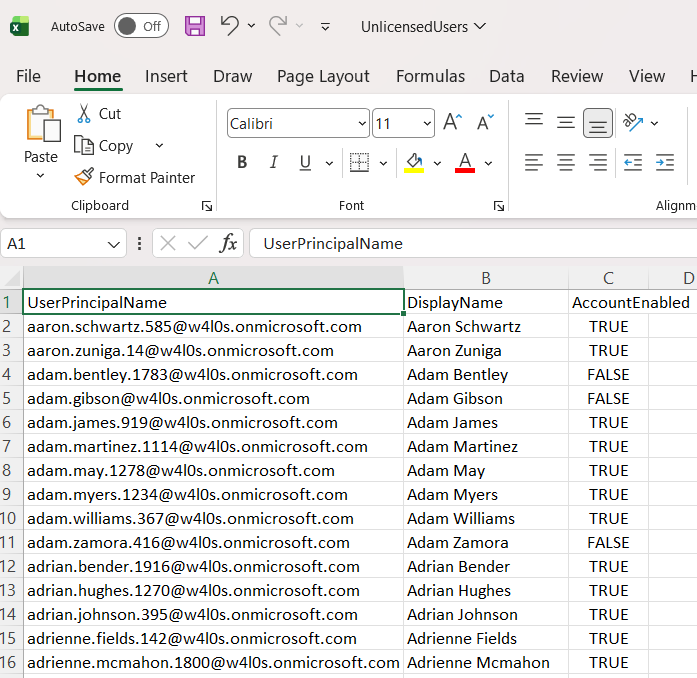
UnlicensedUsers.csv
Shows:
Useful for:
III) Further Enhancements
This script can be extended to:
- Separate reports for enabled vs disabled users
- Identify disabled users still consuming licenses
- Calculate estimated monthly license cost
- Add department column
- Export to Excel (.xlsx) with formatting
- Email report automatically
- Schedule as a recurring audit
Each of these can become dedicated M365Corner articles.
IV) Possible Errors & Solutions
| Error | Cause | Solution |
|---|---|---|
| Insufficient Privileges | Missing required Graph scopes | Ensure these API permissions have been consented by super admin: Connect-MgGraph -Scopes User.Read.All, Organization.Read.All |
| SKU Lookup Returns Blank | License assigned but not returned in SubscribedSku | Verify using:Get-MgSubscribedSku |
| Large Tenant Performance Delay | Thousands of users | Allow sufficient execution time or implement paging optimization in advanced version. |
V) Conclusion
A tenant-wide license audit is essential for:
- Cost control
- Governance enforcement
- Capacity planning
- Security reviews
- Operational maturity
This script provides: Visibility → Structure → Reporting → Governance. Instead of guessing license usage in the admin center, you now have structured data for informed decision-making.