Get-MgServicePrincipalMemberOf – Retrieve Service Principal Group & Directory Memberships
Understanding what a Service Principal is part of (groups, directory roles, administrative units) is crucial for auditing access and permissions in Microsoft 365.
The Get-MgServicePrincipalMemberOf cmdlet helps administrators retrieve all directory objects that a service principal belongs to—making it an essential tool for governance and security analysis.
🚀 Community Edition Released!
Try the M365Corner Microsoft 365 Reporting Tool — your DIY pack with 20+ out-of-the-box M365 reports for Users, Groups, and Teams.
Cmdlet Syntax
Get-MgServicePrincipalMemberOf -ServicePrincipalId <String>Usage Examples
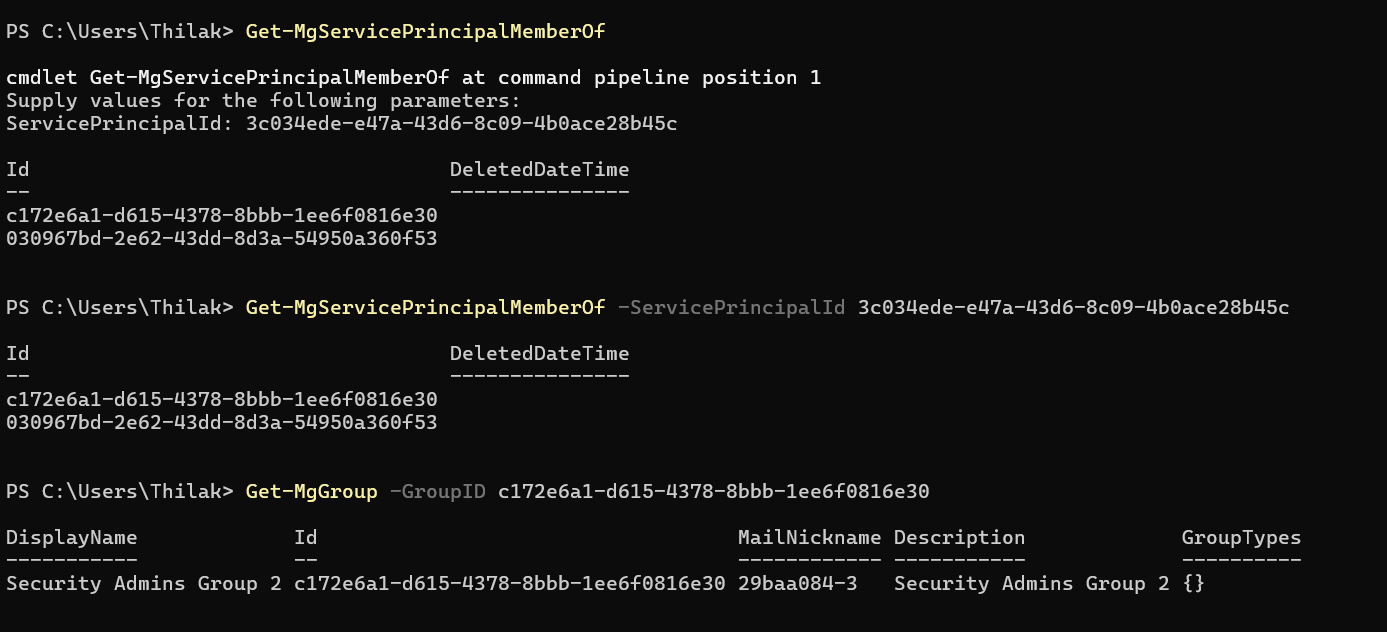
Example 1: Entering ServicePrincipalId When Prompted by PS Console
Get-MgServicePrincipalMemberOf Example 2: Passing ServicePrincipalId Parameter Directly
Get-MgServicePrincipalMemberOf -ServicePrincipalId 3c034ede-e47a-43d6-8c09-4b0ace28b45cExample 3: Retrieve All Memberships (Handle Pagination)
Get-MgServicePrincipalMemberOf -ServicePrincipalId 3c034ede-e47a-43d6-8c09-4b0ace28b45c -AllExample 4: Count Membership Objects
Get-MgServicePrincipalMemberOf -ServicePrincipalId 3c034ede-e47a-43d6-8c09-4b0ace28b45c
-ConsistencyLevel eventual -CountVariable CountVar
$CountVar
Cmdlet Tips
| Tip | Description |
|---|---|
| Use -All for complete results | By default, results are paginated. Use -All to retrieve all memberships. |
| Objects returned are generic directory objects | The output may include groups, directory roles, or admin units—type differentiation may be needed. |
| Combine with Get-MgGroup or Get-MgDirectoryRole | Use additional cmdlets to extract detailed information from returned object IDs. |
| Use -ConsistencyLevel eventual for advanced queries | Required when using -CountVariable. |
| Filter locally if needed | The cmdlet doesn’t support direct filtering—pipe results to Where-Object. |
Use Cases
| Scenario | How It Helps |
|---|---|
| Audit Service Principal Access | Identify which groups or roles a service principal is part of. |
| Security Review | Detect over-privileged applications with unnecessary access. |
| Compliance Reporting | Generate reports of application-level permissions and memberships. |
| Troubleshooting Access Issues | Check if a service principal is missing required group/role memberships. |
| Migration & Cleanup | Identify unused or redundant memberships before cleanup. |
Frequently Asked Questions
| Question | Answer |
|---|---|
| What does this cmdlet return? | It returns directory objects (groups, roles, admin units) that the service principal belongs to. |
| Can I filter results directly? | No, filtering is not supported natively. Use Where-Object for filtering. |
| Does it return group names? | Not always directly. You may need to query additional properties or use other cmdlets. |
| Is -All mandatory? | Not mandatory, but recommended to avoid missing paginated results. |
| Can this be used for users? | No. This cmdlet is specifically for service principals. Use Get-MgUserMemberOf for users. |
Possible Errors & Solutions
| Error | Cause | Solution |
|---|---|---|
| ❌ ResourceNotFound | Invalid ServicePrincipalId | Verify the Service Principal ID using Get-MgServicePrincipal. |
| ❌ Insufficient privileges | Missing required permissions | Ensure you have permissions like Directory.Read.All. |
| ❌ Empty results | Service principal has no memberships | Confirm whether the SP is actually assigned to any group or role. |
| ❌ Pagination issues | Large dataset not fully retrieved | Use the -All parameter. |
| ❌ Count not working | Missing consistency level | Add -ConsistencyLevel eventual when using -CountVariable. |
Conclusion
The Get-MgServicePrincipalMemberOf cmdlet is a powerful tool for administrators who need visibility into service principal memberships across Microsoft 365. Whether you're performing security audits, troubleshooting access issues, or managing application permissions, this cmdlet provides critical insights into how service principals are integrated within your directory.
For best results, combine it with other Graph PowerShell cmdlets to enrich and analyze the returned directory objects.