Get-MgGroupMemberAsUser: Graph PowerShell Cmdlet
In Microsoft Entra ID (Azure AD), group memberships can include a mix of users, devices, service principals, contacts, and even other groups. In many real-world scenarios—such as access reviews, license checks, or HR-driven audits—administrators need only the user accounts from a group.
The Get-MgGroupMemberAsUser cmdlet is designed precisely for this purpose. It returns only user objects that are direct members of a Microsoft 365 / Entra ID group, automatically filtering out non-user objects like devices, service principals, nested groups, and contacts.
🚀 Community Edition Released!
Try the M365Corner Microsoft 365 Reporting Tool — your DIY pack with 20+ out-of-the-box M365 reports for Users, Groups, and Teams.
i) Cmdlet Syntax
Get-MgGroupMemberAsUser -GroupId <String>Key parameter:
- -GroupId: The object ID of the Microsoft 365 or Entra ID group whose user members you want to retrieve. If not provided, the console prompts for it.
ii) Usage Examples
Example 1: Passing GroupId when requested by the console
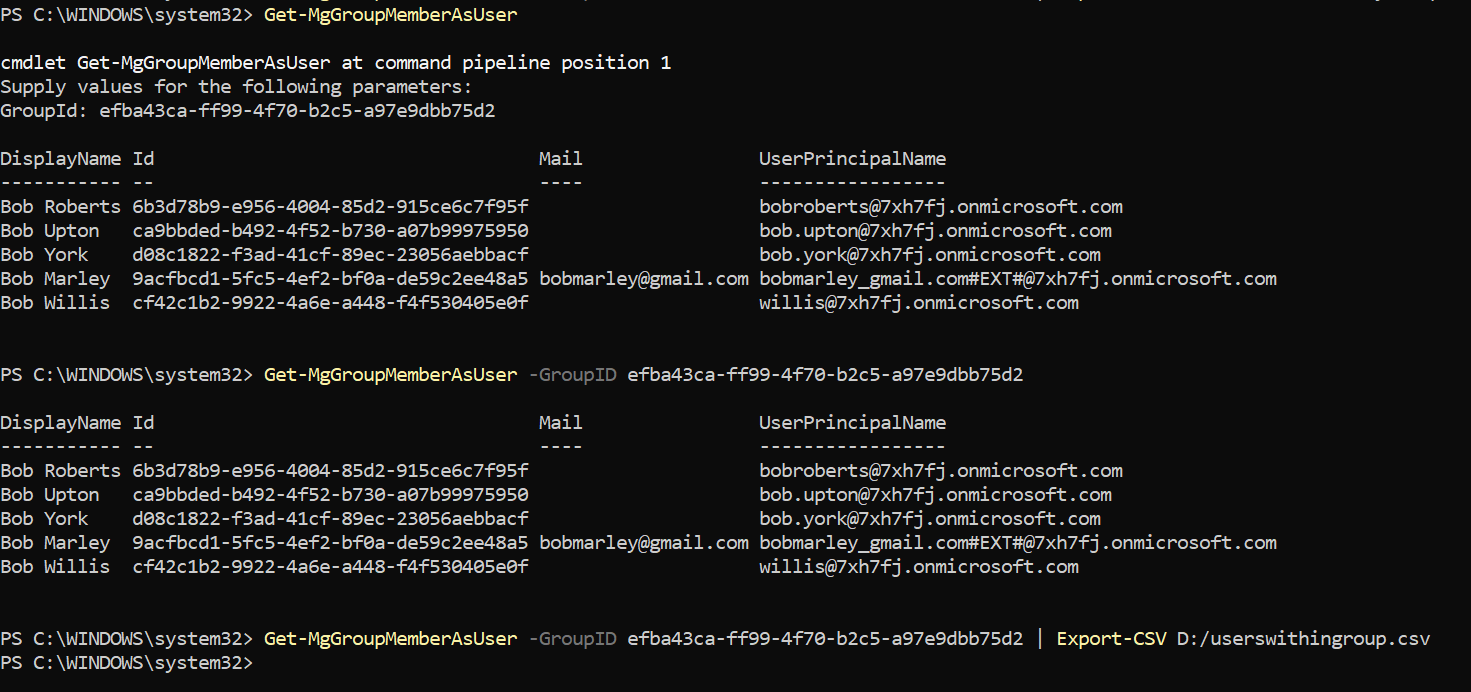
Get-MgGroupMemberAsUserExplanation:
When run without parameters, the cmdlet prompts you to enter the GroupId. After providing it, the cmdlet returns only the user objects that are direct members of the group.
Example 2: Passing GroupId directly
Get-MgGroupMemberAsUser -GroupID efba43ca-ff99-4f70-b2c5-a97e9dbb75d2Explanation:
This command retrieves all direct user members of the specified group, excluding devices, service principals, contacts, and nested groups.
Example 3: Exporting the results to CSV
Get-MgGroupMemberAsUser -GroupID efba43ca-ff99-4f70-b2c5-a97e9dbb75d2 |
Export-CSV D:/AbnormalSecurityGroup.csv
Explanation:
Exports the list of user members to a CSV file, making it easy to share the data or use it for audits and reporting.
iii) Cmdlet Tips
- This cmdlet returns only user objects—no devices, service principals, groups, or contacts.
- Membership returned is direct membership only; nested group users are not expanded.
- Ideal for scenarios where mixed group memberships make standard member queries noisy.
- Combine with Select-Object to export only required properties such as DisplayName, UPN, or Department.
- Works with Microsoft 365 groups, security groups, and mail-enabled security groups.
iv) Possible Errors & Solutions
| Error / Message | Cause | Solution |
| Authorization_RequestDenied | Insufficient permissions | Ensure Group.Read.All and User.Read.All are granted with admin consent. |
| ResourceNotFound | Invalid GroupId | Verify the group object ID in the Entra admin center. |
| Empty output | Group has no direct user members | Check if users are added via nested groups or if the group contains only non-user objects. |
| Cmdlet not recognized | Microsoft.Graph module missing | Install or update the module using Install-Module Microsoft.Graph. |
v) Conclusion
The Get-MgGroupMemberAsUser cmdlet is a highly practical tool for administrators who need a clean, user-only view of group membership in Microsoft Entra ID. By automatically filtering out non-user objects, it simplifies audits, reporting, and troubleshooting—saving time and eliminating the need for additional filtering logic in scripts.