Get-MgDirectoryDeletedItemAsServicePrincipal: Retrieve Deleted Service Principals Using Graph PowerShell
Managing Azure AD / Microsoft Entra applications often involves tracking service principals that were deleted accidentally or during cleanup operations. Administrators may need to review these deleted objects before permanently removing them or restoring them.
The Get-MgDirectoryDeletedItemAsServicePrincipal cmdlet in Microsoft Graph PowerShell allows administrators to retrieve service principals that exist in the directory’s deleted items container.
This article explains the cmdlet syntax, practical usage examples, tips, and common errors administrators may encounter.
🚀 Community Edition Released!
Try the M365Corner Microsoft 365 Reporting Tool — your DIY pack with 20+ out-of-the-box M365 reports for Users, Groups, and Teams.
Cmdlet Syntax
Get-MgDirectoryDeletedItemAsServicePrincipal [-DirectoryObjectId <String>]Key Parameter
| Parameter | Description |
|---|---|
| DirectoryObjectId | Specifies the ID of a deleted service principal to retrieve a specific object from the deleted items container |
Usage Examples
- Retrieve All Deleted Service Principals
- Retrieve a Specific Deleted Service Principal
- Export Deleted Service Principals to CSV
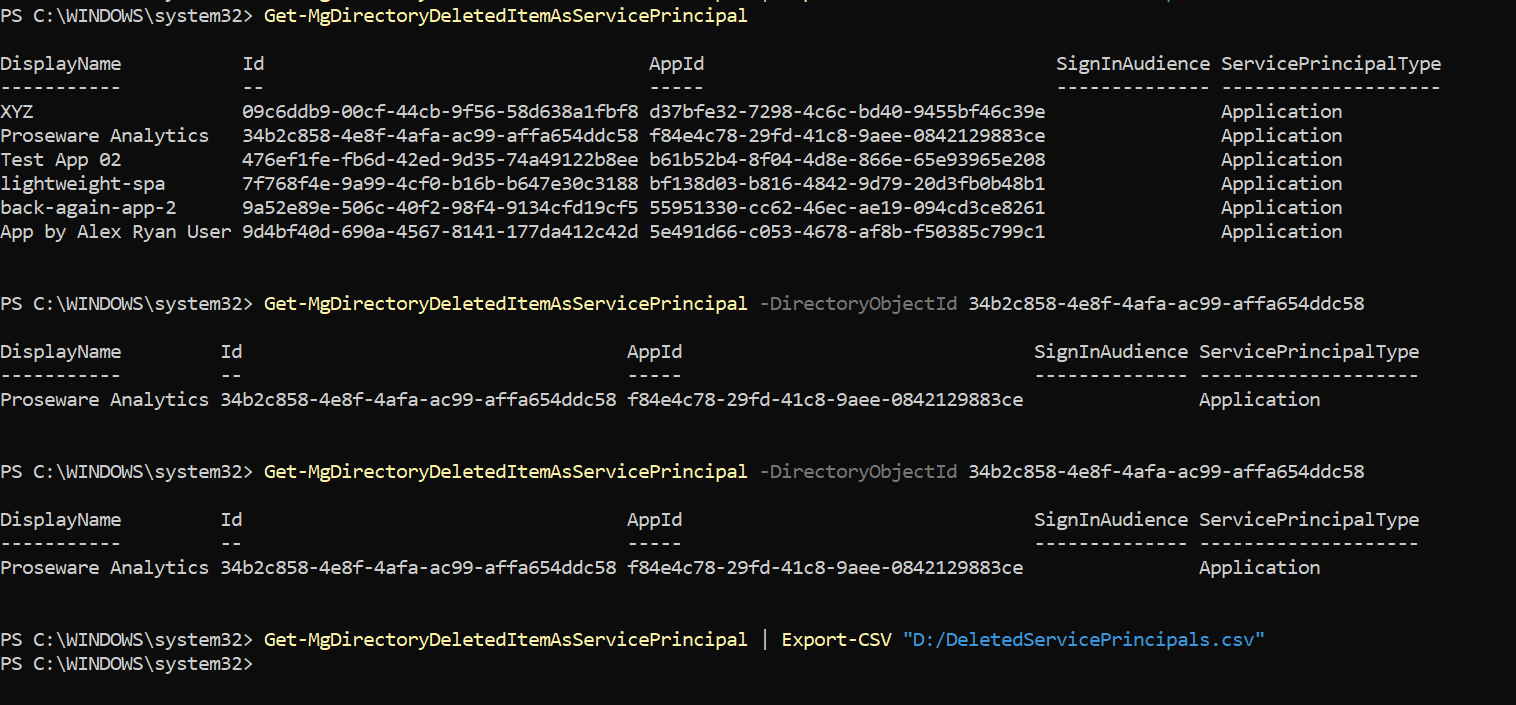
This command retrieves all deleted service principals present in the directory’s deleted items container.
Get-MgDirectoryDeletedItemAsServicePrincipalThis is useful when administrators want to review deleted applications or service principals before taking further action such as restoring them.
To retrieve a specific deleted service principal, provide the Directory Object ID.
Get-MgDirectoryDeletedItemAsServicePrincipal -DirectoryObjectId 34b2c858-4e8f-4afa-ac99-affa654ddc58This command fetches detailed information about the specified deleted service principal.
Administrators may want to export deleted service principal data for auditing or documentation purposes.
Get-MgDirectoryDeletedItemAsServicePrincipal | Export-CSV "D:/DeletedServicePrincipals.csv"This command exports the retrieved deleted service principal data to a CSV file for further analysis.
Cmdlet Tips
- Deleted Objects Are Retained Temporarily
- Useful for Application Recovery Scenarios
- Combine with Restore Cmdlets
- Permissions Are Required
Deleted service principals are stored in the deleted items container for a limited time (typically 30 days) before being permanently removed.
If an application or automation stops working unexpectedly, checking deleted service principals can help determine whether the object was accidentally removed.
After identifying a deleted service principal, administrators can use restore-related cmdlets such as:
Restore-MgDirectoryDeletedItem to recover the deleted object.
To retrieve deleted directory objects, ensure your session includes permissions such as:
Directory.Read.All or Directory.ReadWrite.All
Example connection:
Connect-MgGraph -Scopes "Directory.Read.All"Possible Errors & Solutions
| Error | Cause | Solution |
|---|---|---|
| Get-MgDirectoryDeletedItemAsServicePrincipal : Insufficient privileges to complete the operation. | The Graph session does not have sufficient directory permissions to retrieve deleted directory objects. | Reconnect to Microsoft Graph with appropriate permissions: Connect-MgGraph -Scopes "Directory.Read.All" or Connect-MgGraph -Scopes "Directory.ReadWrite.All" |
| Resource ' |
The specified DirectoryObjectId does not exist in the deleted items container. | Verify the object ID or retrieve all deleted service principals first: Get-MgDirectoryDeletedItemAsServicePrincipal Then confirm the correct object ID. |
| Get-MgDirectoryDeletedItemAsServicePrincipal : Cannot bind parameter 'DirectoryObjectId'. | An invalid or improperly formatted object ID was passed to the cmdlet. | Ensure the ID is a valid GUID format, such as: 34b2c858-4e8f-4afa-ac99-affa654ddc58 |
Conclusion
The Get-MgDirectoryDeletedItemAsServicePrincipal cmdlet helps administrators retrieve service principals that have been deleted but are still retained in the directory’s deleted items container. This capability is particularly useful when auditing application removals, troubleshooting broken integrations, or preparing to restore deleted service principals.
By using this cmdlet, administrators can quickly identify deleted service principals, retrieve specific objects using their DirectoryObjectId, and export the results for further analysis or documentation.