Find Team Member and Owner Counts
Microsoft Teams governance is a key responsibility for administrators managing collaboration environments. Understanding the number of owners and members in each team is critical for:
- Ensuring proper ownership coverage
- Preventing orphaned teams
- Monitoring team size and usage
- Supporting compliance and audits
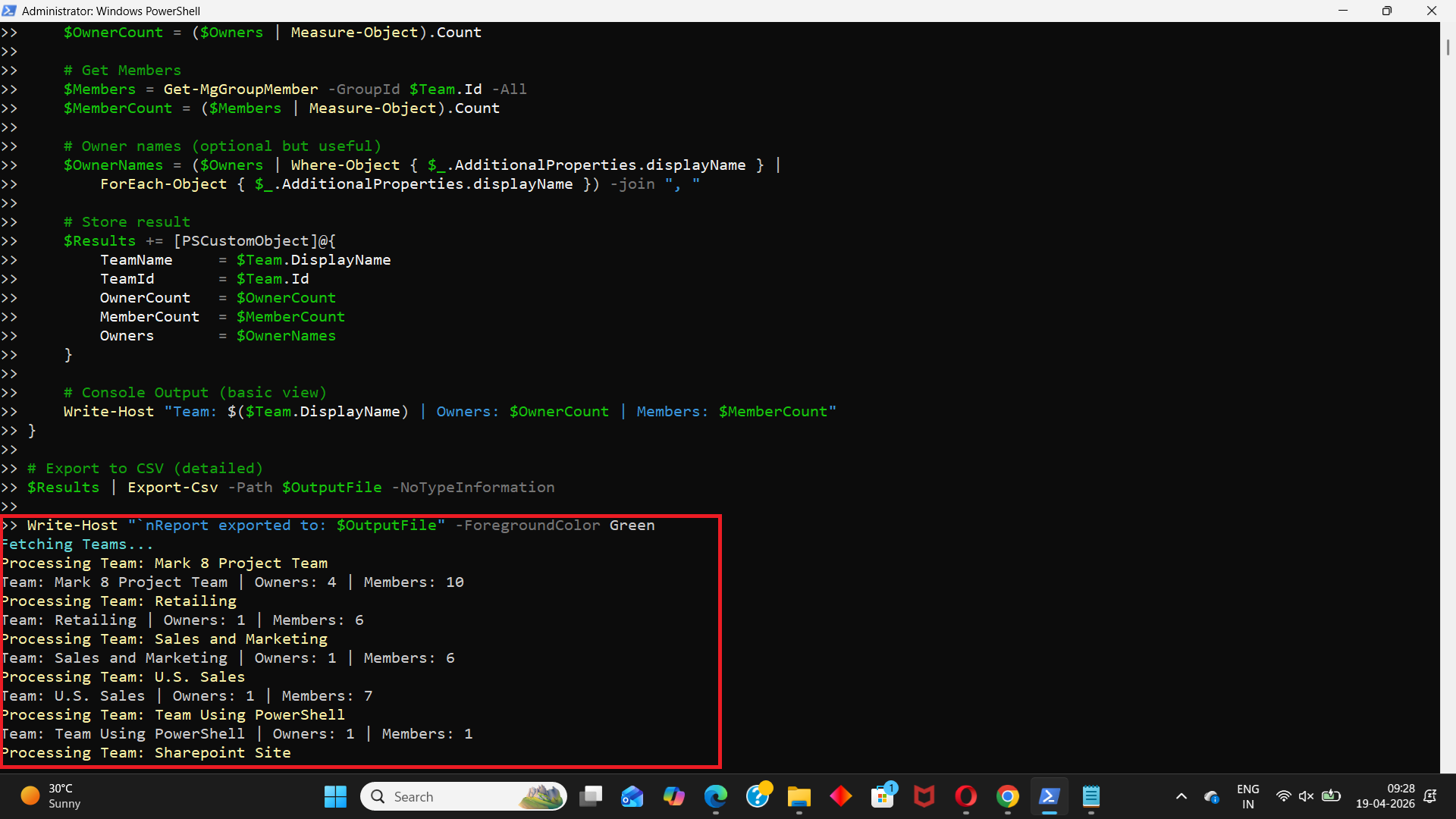
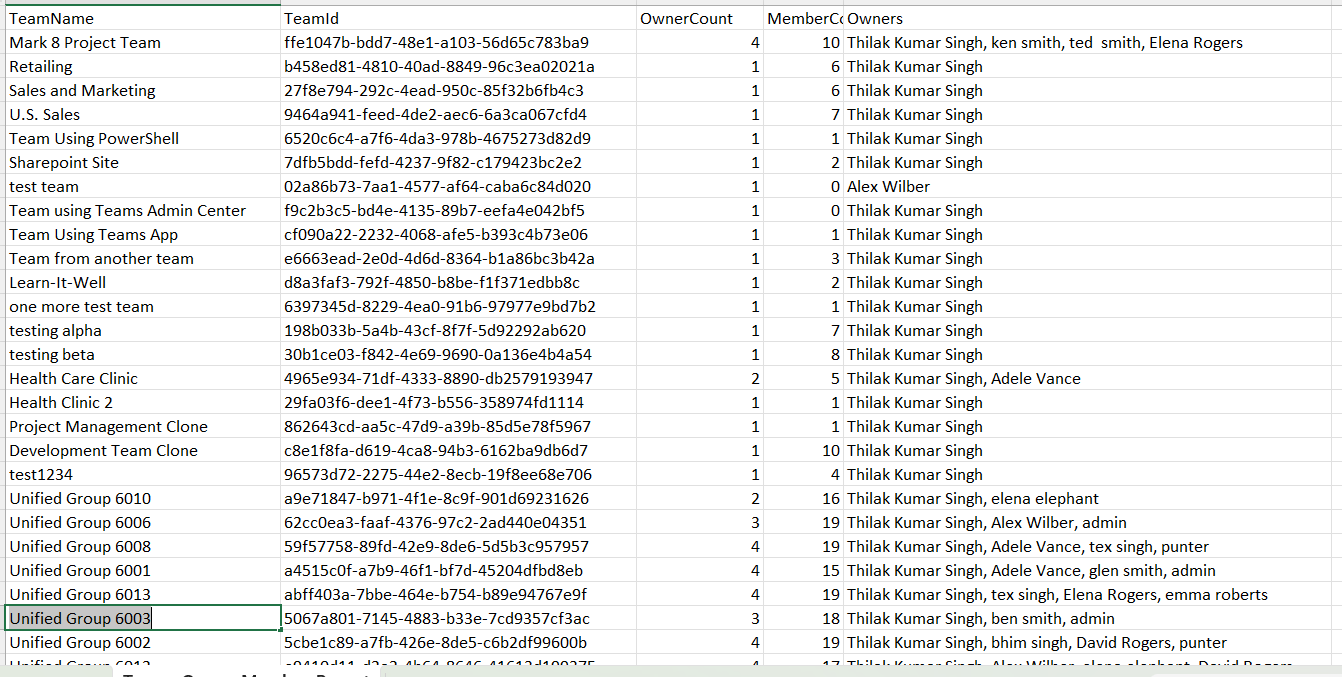
This script helps administrators fetch all Microsoft Teams along with their owner and member counts, providing a clear overview of team structure and ownership distribution.
Download this script from our M365Corner GitHub Repo: https://github.com/m365corner/M365Corner-Scripts/tree/main/Teams-Related-Scripts/Find-Team-Member-And-Owner-Counts🚀 Community Edition Released!
Try the M365Corner Microsoft 365 Reporting Tool — your DIY pack with 20+ out-of-the-box M365 reports for Users, Groups, and Teams.
The Script
# Output file
$OutputFile = "D:/Teams_Owner_Member_Report.csv"

# Get all Teams (Unified Groups with Teams)
Write-Host "Fetching Teams..." -ForegroundColor Cyan
$Teams = Get-MgGroup -Filter "resourceProvisioningOptions/Any(x:x eq 'Team')" -All

$Results = @()

foreach ($Team in $Teams) {

    Write-Host "Processing Team: $($Team.DisplayName)" -ForegroundColor Yellow

    # Get Owners
    $Owners = Get-MgGroupOwner -GroupId $Team.Id -All
    $OwnerCount = ($Owners | Measure-Object).Count

    # Get Members
    $Members = Get-MgGroupMember -GroupId $Team.Id -All
    $MemberCount = ($Members | Measure-Object).Count

    # Owner names
    $OwnerNames = ($Owners | Where-Object { $_.AdditionalProperties.displayName } |
        ForEach-Object { $_.AdditionalProperties.displayName }) -join ", "

    # Store result
    $Results += [PSCustomObject]@{
        TeamName     = $Team.DisplayName
        TeamId       = $Team.Id
        OwnerCount   = $OwnerCount
        MemberCount  = $MemberCount
        Owners       = $OwnerNames
    }

    Write-Host "Team: $($Team.DisplayName) | Owners: $OwnerCount | Members: $MemberCount"
}

# Export to CSV
$Results | Export-Csv -Path $OutputFile -NoTypeInformation

Write-Host "`nReport exported to: $OutputFile" -ForegroundColor Green
How the Script Works
| Step | Description |
|---|---|
| Define Output File | Sets the CSV export path for the report |
| Fetch Teams | Uses Get-MgGroup with filter to retrieve Teams-enabled groups |
| Loop Through Teams | Iterates through each Team |
| Get Owners | Retrieves owners using Get-MgGroupOwner |
| Count Owners | Uses Measure-Object to calculate owner count |
| Get Members | Retrieves members using Get-MgGroupMember |
| Count Members | Calculates total member count |
| Extract Owner Names | Pulls display names from owner objects |
| Build Report | Stores team details in a structured object |
| Export Results | Exports the data to a CSV file |
Further Enhancements
| Enhancement | Description |
|---|---|
| Include Team Visibility | Add public/private classification |
| Add Channel Count | Retrieve number of channels per team |
| Include Last Activity | Combine with activity reports |
| Identify Orphaned Teams | Flag teams with zero owners |
| Automate Reporting | Schedule script for regular audits |
Frequently Asked Questions
| Question | Answer |
|---|---|
| How does the script identify Teams? | By filtering groups with resourceProvisioningOptions = Team |
| Can a Team have zero owners? | Yes, but it is not recommended |
| Are owners included in member count? | Yes, owners are also members in Teams |
| Can this script handle large tenants? | Yes, but execution time may increase |
| Does it include guest users? | Yes, if they are members of the Team |
Admin Usecases
| Use Case | Description |
|---|---|
| Governance Audit | Ensure every Team has sufficient owners |
| Compliance Reporting | Track ownership and membership structure |
| Team Health Check | Identify large or inactive Teams |
| Ownership Validation | Detect Teams with too few owners |
| Documentation | Maintain records of Teams and their structure |
Possible Errors & Solutions
| Error | Cause | Solution |
|---|---|---|
| Insufficient privileges | Missing Graph permissions | Use Group.Read.All or Directory.Read.All |
| Cmdlet not recognized | Graph module not installed | Install using Install-Module Microsoft.Graph |
| Access token expired | Session timeout | Reconnect using Connect-MgGraph |
| Slow execution | Large number of Teams | Optimize using filtering |
| Missing displayName | Object property not populated | Handle null values in script |
Conclusion
Monitoring Microsoft Teams ownership and membership is essential for maintaining a well-governed collaboration environment. Teams with insufficient owners or excessive members can lead to operational inefficiencies and governance challenges.
This Microsoft Graph PowerShell script provides an efficient way to analyze Teams by retrieving owner and member counts, helping administrators gain valuable insights into team structure.
By incorporating this script into regular audits, organizations can improve their Teams governance, ensure proper ownership coverage, and maintain compliance standards.
- Improving security posture
- Reducing token exposure risks
- Migrating to modern authentication methods
By incorporating this script into regular audits, organizations can ensure they stay aligned with modern authentication best practices and maintain a secure Entra ID environment.