Find Entra Apps With Service Principal Owners
In Microsoft Entra ID, application ownership is typically assigned to users. However, in some cases, applications are owned by service principals instead of users.
While this is valid in certain automation scenarios, it can introduce governance challenges such as:
- Lack of human accountability
- Difficulty in ownership tracking
- Increased complexity in audits
Identifying applications with Service Principal owners helps administrators maintain better control over application governance and security posture.
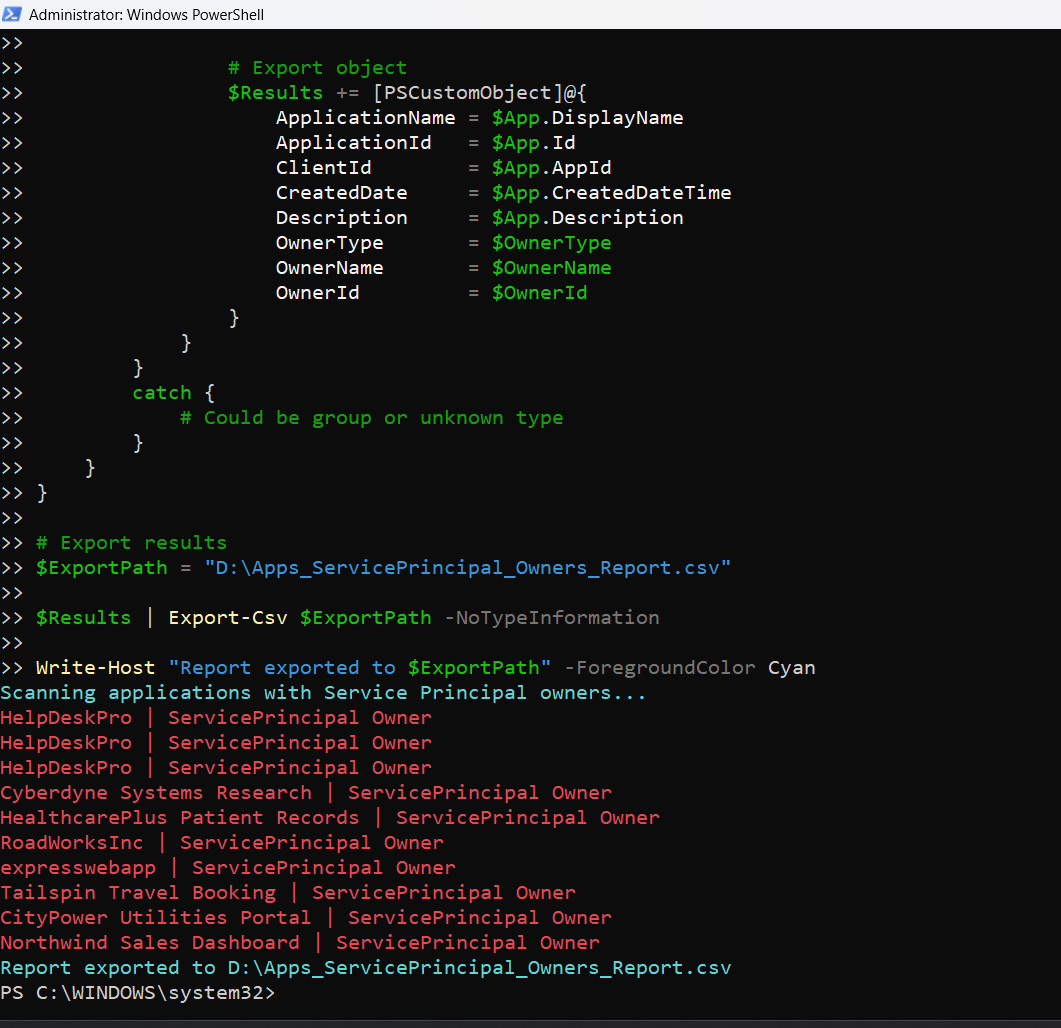
This script enables administrators to detect Entra applications that are owned by Service Principals, providing detailed insights for further action.
Download this script from our M365Corner GitHub Repo: https://github.com/m365corner/M365Corner-Scripts/tree/main/Entra-Apps-Related-Scripts/Find-Entra-Apps-With-Service-Principal-Owners🚀 Community Edition Released!
Try the M365Corner Microsoft 365 Reporting Tool — your DIY pack with 20+ out-of-the-box M365 reports for Users, Groups, and Teams.
The Script
# Connect to Microsoft Graph
Connect-MgGraph -Scopes Application.Read.All, Directory.Read.All

Write-Host "Scanning applications with Service Principal owners..." -ForegroundColor Cyan

# Get all applications
$Applications = Get-MgApplication -All -Property Id,DisplayName,AppId,CreatedDateTime,Description

$Results = @()

foreach ($App in $Applications) {

    $Owners = Get-MgApplicationOwner -ApplicationId $App.Id

    foreach ($Owner in $Owners) {

        $OwnerType = $null
        $OwnerName = "N/A"
        $OwnerId   = "N/A"

        # Try resolving as User first
        try {
            $User = Get-MgUser -UserId $Owner.Id -ErrorAction Stop
            $OwnerType = "User"
            continue   # Skip users — we only want Service Principals
        }
        catch {
            # Not a user, continue checking
        }

        # Try resolving as Service Principal
        try {
            $SP = Get-MgServicePrincipal -ServicePrincipalId $Owner.Id -ErrorAction Stop

            if ($SP) {
                $OwnerType = "ServicePrincipal"
                $OwnerName = $SP.DisplayName
                $OwnerId   = $SP.Id

                # Console output (minimal)
                Write-Host "$($App.DisplayName) | ServicePrincipal Owner" -ForegroundColor Red

                # Export object
                $Results += [PSCustomObject]@{
                    ApplicationName = $App.DisplayName
                    ApplicationId   = $App.Id
                    ClientId        = $App.AppId
                    CreatedDate     = $App.CreatedDateTime
                    Description     = $App.Description
                    OwnerType       = $OwnerType
                    OwnerName       = $OwnerName
                    OwnerId         = $OwnerId
                }
            }
        }
        catch {
            # Could be group or unknown type
        }
    }
}

# Export results
$ExportPath = "C:\Path\Apps_ServicePrincipal_Owners_Report.csv"

$Results | Export-Csv $ExportPath -NoTypeInformation

Write-Host "Report exported to $ExportPath" -ForegroundColor Cyan

How the Script Works
| Step | Description |
|---|---|
| Connect to Graph | Authenticates using Application.Read.All and Directory.Read.All |
| Retrieve Applications | Fetches all Entra applications using Get-MgApplication -All |
| Fetch Owners | Retrieves application owners using Get-MgApplicationOwner |
| Identify Owner Type | Attempts to resolve owner as a user first |
| Skip User Owners | Uses continue to skip user-based owners |
| Resolve Service Principals | Attempts to resolve owner as a service principal |
| Capture Details | Extracts display name and ID for service principal |
| Build Report | Stores application and owner details |
| Export Results | Exports findings to a CSV file |
Further Enhancements
| Enhancement | Description |
|---|---|
| Include Owner Count | Add total number of owners per application |
| Add Permission Analysis | Combine with permission checks for risk assessment |
| Include Group Owners | Extend script to detect group-based ownership |
| Add Risk Tagging | Mark apps with service principal owners as medium/high risk |
| Automate Audits | Schedule periodic execution for governance tracking |
Frequently Asked Questions
| Question | Answer |
|---|---|
| What is a Service Principal owner? | A non-user identity used for automation or app-to-app interactions |
| Why is this important? | Service principals lack direct human accountability |
| Are service principal owners bad? | Not always, but they require careful monitoring |
| Can apps have both user and service principal owners? | Yes, mixed ownership is possible |
| Does this script detect group owners? | No, only user and service principal owners |
Admin Usecases
| Use Case | Description |
|---|---|
| Governance Audit | Identify non-user ownership patterns |
| Security Review | Detect apps owned by automation identities |
| Compliance Checks | Ensure ownership policies are followed |
| Risk Assessment | Identify apps lacking human accountability |
| Documentation | Maintain ownership records for audit purposes |
Possible Errors & Solutions
| Error | Cause | Solution |
|---|---|---|
| Insufficient privileges | Missing Graph permissions | Use Application.Read.All and Directory.Read.All |
| Cmdlet not recognized | Graph module not installed | Install using Install-Module Microsoft.Graph |
| Access token expired | Session timeout | Reconnect using Connect-MgGraph |
| Owner not resolved | Owner is group or unknown type | Extend script to handle additional object types |
| Slow execution | Large tenant | Optimize by filtering or batching |
Conclusion
Applications with Service Principal owners introduce a unique governance challenge in Microsoft Entra ID. While they are essential for automation and integrations, they lack direct human accountability, making them harder to track and manage.
This Microsoft Graph PowerShell script provides an effective way to identify applications owned by service principals, helping administrators gain visibility into non-user ownership patterns.
By incorporating this script into regular governance workflows, organizations can improve their ownership transparency, security posture, and compliance readiness.