Export Microsoft 365 Dynamic Group Inventory Using Graph PowerShell (CSV Report)
As Microsoft 365 environments grow, dynamic membership groups become increasingly common. Over time, administrators often need a quick inventory of all dynamic groups in the tenant—including their membership rules, processing state, and basic configuration—for auditing, troubleshooting, or documentation purposes.
In this article, we’ll walk through a Graph PowerShell script that inventories all dynamic membership groups in Microsoft 365 and exports the results to a CSV report for easy reference.
🚀 Community Edition Released!
Try the M365Corner Microsoft 365 Reporting Tool — your DIY pack with 20+ out-of-the-box M365 reports for Users, Groups, and Teams.
Prerequisites
Before running the script, ensure:
- Microsoft Graph PowerShell module is installed
- You are connected to Microsoft Graph with at least:
- Group.Read.All permission
Connect-MgGraph -Scopes "Group.Read.All"i) The Script
The following script retrieves all active admin assignments in the tenant, resolves the role name, identifies the principal type, determines whether the assignment is permanent or PIM-activated, displays the results on the console, and exports them to a CSV file.
Required permissions
Before running the script, connect to Microsoft Graph with the following permissions:
- RoleManagement.Read.Directory
- Directory.Read.All
Connect-MgGraph -Scopes "RoleManagement.Read.Directory","Directory.Read.All"PowerShell Script – Fetch Active Admins
# -----------------------------
# Dynamic Group Inventory Report
# Exports all Dynamic Membership groups to CSV
# -----------------------------

# Output path (update if needed)
$ReportPath = "D:\DynamicGroupInventoryReport_{0}.csv" -f (Get-Date -Format "yyyyMMdd_HHmmss")

# Ensure Graph is connected (recommended scopes)
# Connect-MgGraph -Scopes "Group.Read.All"

try {
    Write-Host "Fetching dynamic membership groups..." -ForegroundColor Cyan

    # Filter groups that have DynamicMembership in groupTypes
    # ConsistencyLevel Eventual is added for reliability with advanced queries
    $DynamicGroups = Get-MgGroup -All `
        -ConsistencyLevel Eventual `
        -CountVariable DynamicGroupCount `
        -Filter "groupTypes/any(c:c eq 'DynamicMembership')" `
        -Property "id,displayName,description,mailNickname,groupTypes,mailEnabled,securityEnabled,visibility,membershipRule,membershipRuleProcessingState,createdDateTime"

    if (-not $DynamicGroups) {
        Write-Host "No dynamic membership groups found in this tenant." -ForegroundColor Yellow
        return
    }

    Write-Host "Total dynamic membership groups found: $DynamicGroupCount" -ForegroundColor Green

    # Build inventory output
    $Report = $DynamicGroups | Sort-Object DisplayName | Select-Object `
        DisplayName,
        Id,
        MailNickname,
        Description,
        Visibility,
        MailEnabled,
        SecurityEnabled,
        MembershipRuleProcessingState,
        MembershipRule,
        @{Name="GroupTypes";Expression={ ($_.GroupTypes -join ",") }},
        CreatedDateTime

    # Export
    $Report | Export-Csv -Path $ReportPath -NoTypeInformation -Encoding UTF8

    Write-Host "Report exported successfully:" -ForegroundColor Green
    Write-Host $ReportPath -ForegroundColor White
}
catch {
    Write-Host "Failed to generate report." -ForegroundColor Red
    Write-Host $_.Exception.Message -ForegroundColor Yellow
}
How the Script Works
Here’s a simplified breakdown of what the script does:
- Defines the output file
- The CSV file name includes a timestamp to avoid overwriting previous reports.
- Retrieves dynamic membership groups
- Uses Get-MgGroup with a filter that targets groups containing DynamicMembership in groupTypes.
- Collects essential group details
- Group name and ID
- Mail and security settings
- Membership rule and processing state
- Group type and creation date
- Formats the data
- Sorts groups alphabetically by display name
- Flattens multi-value properties (like GroupTypes) for CSV readability
- Exports the inventory
- Saves the report as a UTF-8 encoded CSV file
What the Inventory Report Contains
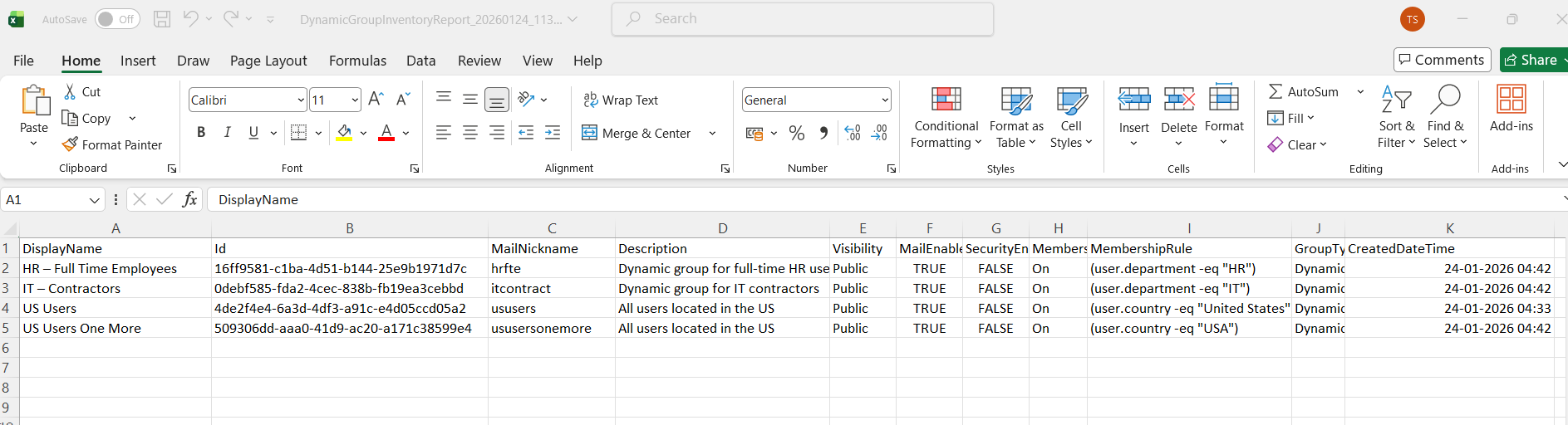
The exported CSV includes the following admin-relevant details:
- DisplayName
- Group ID
- MailNickname
- Description
- Visibility
- MailEnabled
- SecurityEnabled
- MembershipRuleProcessingState
- MembershipRule
- GroupTypes
- CreatedDateTime
This makes the report useful for audits, reviews, and troubleshooting.
Further Enhancements
Once you’re comfortable with this inventory script, you can extend it in several ways:
- Export only Microsoft 365 (Unified) dynamic groups
- Add owner details to the report
- Include last modified date
- Schedule the script to run periodically
- Combine with rule validation or empty-group detection
These enhancements can turn the script into a lightweight dynamic group governance tool
Possible Errors & Solutions
| Error | Cause | Solution |
|---|---|---|
| No Dynamic Groups Found | The tenant may not have any dynamic membership groups. | Verify dynamic groups exist in Entra ID and rerun the script. |
| Insufficient Privileges | Insufficient privileges to complete the operation | Reconnect to Microsoft Graph with Group.Read.All permission. |
| CSV File Not Created | Invalid or inaccessible file path. | Ensure the folder path exists and you have write permissions. |
Conclusion
Maintaining visibility into dynamic membership groups is essential for Microsoft 365 administrators. This Graph PowerShell script provides a simple and effective way to inventory all dynamic groups, capture their rules and configuration, and export everything into a single CSV report.
Whether you’re preparing for an audit, cleaning up legacy groups, or just documenting your environment, this inventory report serves as a reliable reference point for dynamic group management.