🔧 New: User Management Graph PowerShell Toolkit
Simplify user tasks like bulk creation, updates, password resets, deletions, license checks & more — all from one place.
🚀 Launch ToolkitEmail Licensed but Sign-In Disabled Users Report with Graph PowerShell
In large Microsoft 365 environments, it’s common to have users who remain licensed but have their sign-ins disabled — for example, former employees whose data is retained for compliance or users temporarily deactivated for security reasons. These accounts continue to consume licenses, which can impact cost and compliance visibility. This Graph PowerShell script automatically identifies licensed but sign-in disabled users, generates a detailed report, and emails it to administrators for review.
i) Script
Import-Module Microsoft.Graph -ErrorAction Stop
Connect-MgGraph -Scopes "User.Read.All","Directory.Read.All","Mail.Send"

$FromUser   = "admin@contoso.com"
$ToList     = "it-ops@contoso.com;secops@contoso.com"
$Subject    = "Licensed but Sign-in Disabled Users Report"
$CsvOutDir  = "$env:TEMP"

$users = Get-MgUser -All -Property Id,DisplayName,UserPrincipalName,Mail,AccountEnabled,Department,JobTitle,UsageLocation,AssignedLicenses,CreatedDateTime

$licensedDisabledUsers = $users | Where-Object {
    ($_.AssignedLicenses.Count -gt 0) -and ($_.AccountEnabled -eq $false)
}

$rows = $licensedDisabledUsers | ForEach-Object {
    [PSCustomObject]@{
        DisplayName       = $_.DisplayName
        UserPrincipalName = $_.UserPrincipalName
        Mail              = $_.Mail
        Department        = $_.Department
        JobTitle          = $_.JobTitle
        UsageLocation     = $_.UsageLocation
        LicenseCount      = ($_.AssignedLicenses | Measure-Object).Count
        AccountEnabled    = $_.AccountEnabled
        CreatedDate       = $_.CreatedDateTime
    }
}

if (-not (Test-Path -Path $CsvOutDir)) { New-Item -ItemType Directory -Path $CsvOutDir | Out-Null }
$ts = Get-Date -Format "yyyyMMdd_HHmmss"
$csvPath = Join-Path $CsvOutDir ("Licensed_Disabled_Users_{0}.csv" -f $ts)
$rows | Sort-Object DisplayName | Export-Csv -Path $csvPath -NoTypeInformation -Encoding UTF8

$totalUsers = ($rows | Measure-Object).Count
$summaryHtml = @"

<html>
  <body style='font-family:Segoe UI,Arial,sans-serif'>
    <h3>Licensed but Sign-in Disabled Users Report</h3>
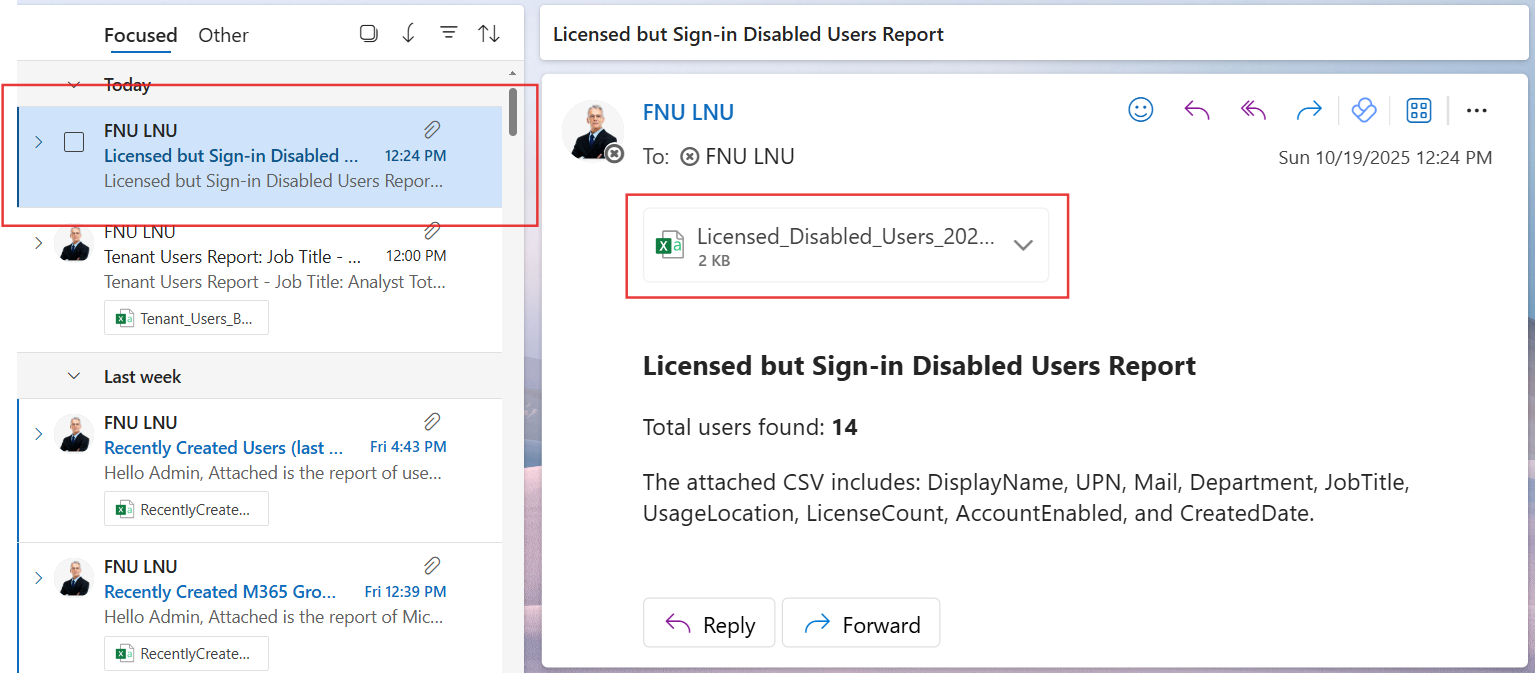
    <p>Total users found: <b>$totalUsers</b></p>
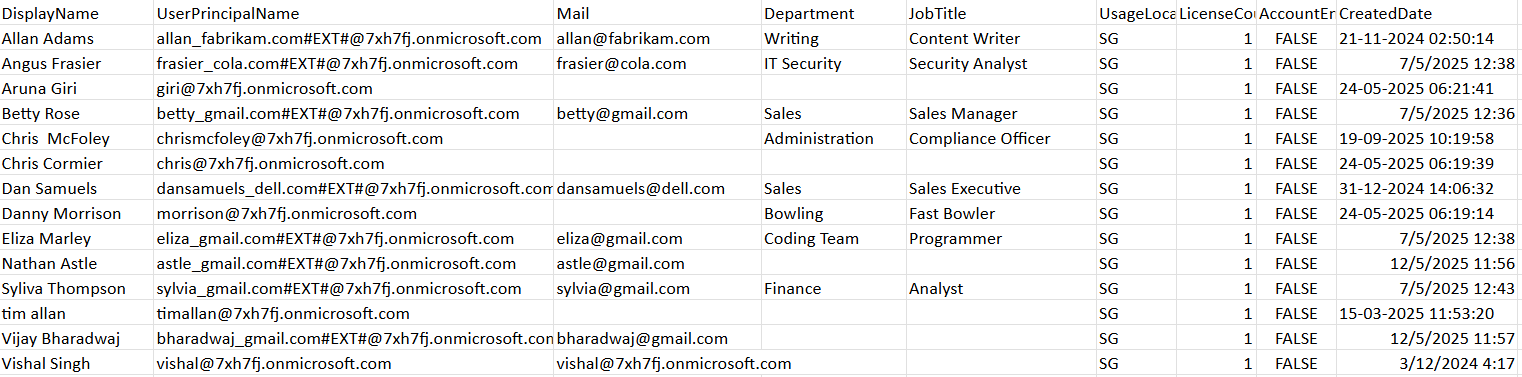
    <p>The attached CSV includes: DisplayName, UPN, Mail, Department, JobTitle, UsageLocation, LicenseCount, AccountEnabled, and CreatedDate.</p>
  </body>
</html>
"@

$fileBytes     = [System.IO.File]::ReadAllBytes($csvPath)
$base64Content = [System.Convert]::ToBase64String($fileBytes)
$csvFileName   = [System.IO.Path]::GetFileName($csvPath)
$attachment = @{
  "@odata.type" = "#microsoft.graph.fileAttachment"
  name          = $csvFileName
  contentBytes  = $base64Content
  contentType   = "text/csv"
}

$recipients = @()
$ToList.Split(@(';', ','), [System.StringSplitOptions]::RemoveEmptyEntries) | ForEach-Object {
  $addr = $_.Trim()
  if ($addr) { $recipients += @{ emailAddress = @{ address = $addr } } }
}

$mail = @{
  message = @{
    subject = "$Subject"
    body    = @{
      contentType = "HTML"
      content     = $summaryHtml
    }
    toRecipients = $recipients
    attachments  = @($attachment)
  }
  saveToSentItems = $true
}

Send-MgUserMail -UserId $FromUser -BodyParameter $mail
Write-Host "Done. Licensed but sign-in disabled users report saved at: $csvPath" -ForegroundColor Green
ii) How the Script Works
- Connects to Microsoft Graph using the necessary scopes:
- User.Read.All and Directory.Read.All to retrieve all users.
- Mail.Send to email the final report.
- Fetches all tenant users and filters them to include only those who have active licenses (AssignedLicenses.Count -gt 0) but with sign-ins disabled (AccountEnabled -eq $false).
- Creates a structured report containing key user properties such as DisplayName, UPN, Department, JobTitle, UsageLocation, and LicenseCount.
- Exports the results to a CSV file in the temporary directory.
- Composes an HTML email summary showing total users found.
- Emails the CSV report to specified recipients.
iii) Further Enhancements
- Include license SKU names (e.g., Microsoft 365 E3, Business Premium) for detailed tracking.
- Add last sign-in date using sign-in activity for deeper analysis.
- Integrate with Azure Automation or Task Scheduler to run the script regularly.
- Store reports in SharePoint or OneDrive for centralized record-keeping.
- Combine with license removal scripts to automate cleanup.
iv) Possible Errors and Solutions
| Error | Cause | Solution |
|---|---|---|
| Authorization_RequestDenied | Missing permissions | Reconnect using User.Read.All, Directory.Read.All, and Mail.Send with admin consent. |
| Get-MgUser not recognized | Microsoft.Graph not installed | Install or update the module using Install-Module Microsoft.Graph. |
| Empty CSV file | No licensed disabled users found | Verify filters and ensure the tenant has matching users. |
| Email not sent | Sender doesn’t have a mailbox | Ensure $FromUser is a licensed mailbox-enabled account. |
| Split error on recipients | Incorrect delimiter | Use ; or , between recipient email addresses. |
v) Conclusion
This Graph PowerShell script offers administrators an automated way to identify licensed users who are sign-in disabled, helping maintain license hygiene and cost efficiency. By scheduling this report weekly or monthly, IT teams can stay proactive — reclaiming unused licenses, ensuring compliance, and optimizing resource allocation within Microsoft 365.