Bulk Add Members to Microsoft 365 Role-Assignable Security Groups (Graph PowerShell)
Once role-assignable security groups are created, the next real-world task is populating them with the right users. Adding members in bulk ensures consistency, saves time, and avoids manual errors—especially when these groups are tied to privileged Entra ID roles.
This script demonstrates how to bulk add users to a role-assignable Microsoft 365 security group using Microsoft Graph PowerShell. The approach is clean, direct, and fully aligned with how Graph expects directory object references to be handled.
🚀 Community Edition Released!
Try the M365Corner Microsoft 365 Reporting Tool — your DIY pack with 20+ out-of-the-box M365 reports for Users, Groups, and Teams.
i) The Script
# Target role-assignable group
$GroupId = "06003785-10c5-4a8b-abd0-95c5041cc160"

# Users to add
$Users = @(
    @{ UPN = "ana.petersen.72@w4l0s.onmicrosoft.com"; Id = "53a322b9-85fb-427a-ae70-1f413db7f745" }
    @{ UPN = "andrea.hernandez.916@w4l0s.onmicrosoft.com"; Id = "1e58d730-1f23-460e-8dd3-8f62cdda4820" }
    @{ UPN = "andrea.perry.1647@w4l0s.onmicrosoft.com"; Id = "e47b6c85-bf49-460f-b327-ac4af8a2abb1" }
    @{ UPN = "andrew.oneal.519@w4l0s.onmicrosoft.com"; Id = "a6540602-617d-4fb4-a9f7-b9c3eb5214ae" }
    @{ UPN = "andrew.wheeler.1632@w4l0s.onmicrosoft.com"; Id = "50e81b82-4bee-47c3-81bf-dc606b253f2e" }
)

foreach ($User in $Users) {

    Write-Host "Adding user:" $User.UPN

    New-MgGroupMemberByRef `
        -GroupId $GroupId `
        -BodyParameter @{
            "@odata.id" = "https://graph.microsoft.com/v1.0/directoryObjects/$($User.Id)"
        }

    Write-Host "Successfully added:" $User.UPN
}

Write-Host "All users have been added to GA-Role-Group-7."
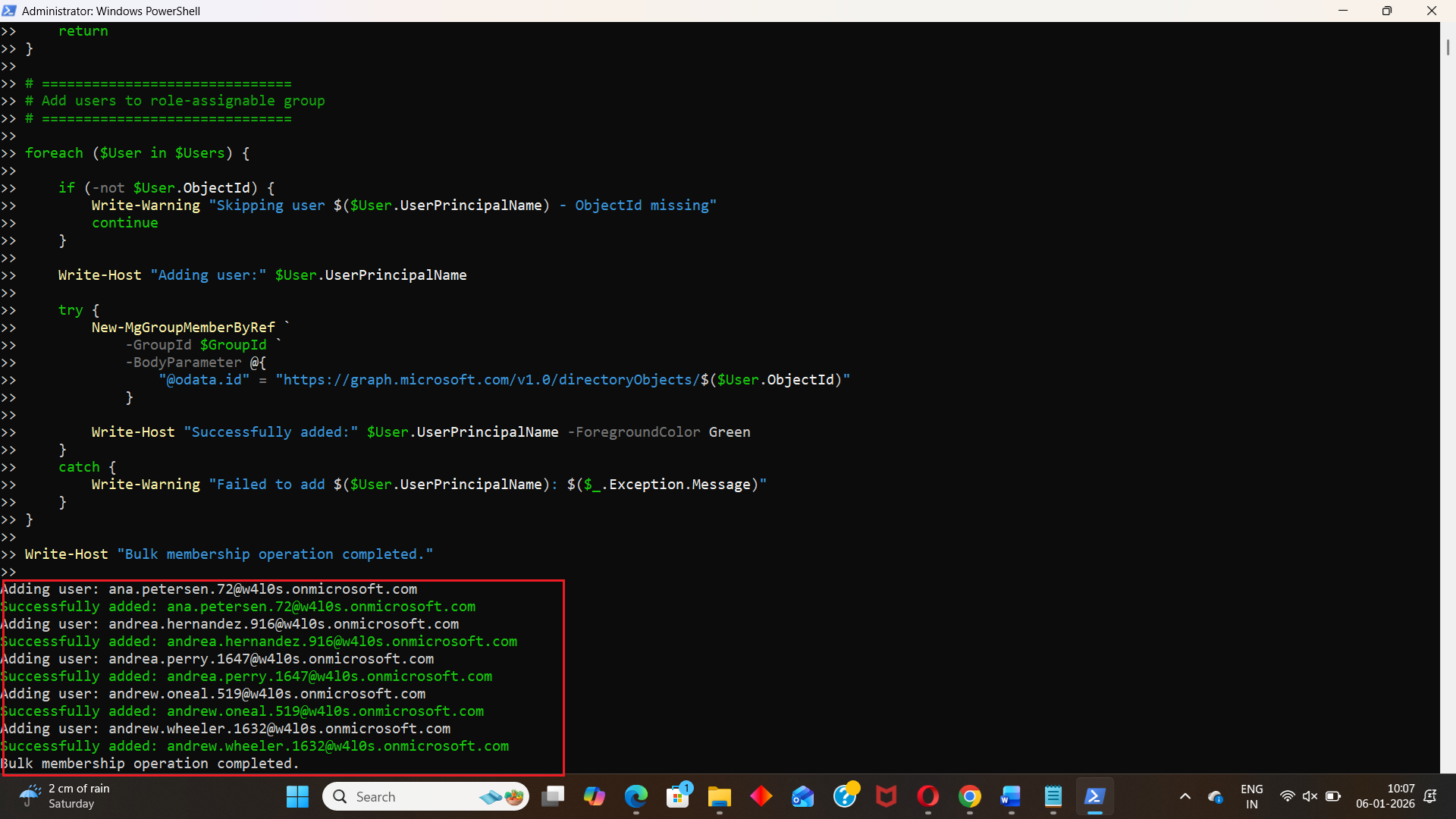
ii) How the Script Works
- Identifies the target role-assignable group
- Defines the users to be added
- UPN → Used only for logging and readability
- Id → The actual User Object ID, which Graph requires
- Loops through each user
- Prints a friendly status message
- Adds the user to the group
- Confirms successful addition
- Adds the user using a directory object reference
- Displays completion status
The script starts by defining the GroupId of the role-assignable security group:
$GroupId = "06003785-10c5-4a8b-abd0-95c5041cc160"
This must be the Object ID of an existing role-assignable security group.
Users are stored in an in-memory array of hashtables. Each entry includes:
@{ UPN = "..."; Id = "..." }
This is important because Graph does not accept UPNs directly for group membership references—it requires directory object IDs.
The foreach loop processes one user at a time:
Membership is added using:
New-MgGroupMemberByRef
The key part is the @odata.id reference:
"https://graph.microsoft.com/v1.0/directoryObjects/$($User.Id)"
This tells Microsoft Graph exactly which directory object (user) should be added to the group.
After all users are processed, the script prints a final confirmation message indicating successful completion.
CSV File Format
Although the script uses an inline array, it clearly indicates what data is required. If you later convert this logic to a CSV-driven approach, your CSV should look like this:
UPN,Id
ana.petersen.72@w4l0s.onmicrosoft.com,53a322b9-85fb-427a-ae70-1f413db7f745
andrea.hernandez.916@w4l0s.onmicrosoft.com,1e58d730-1f23-460e-8dd3-8f62cdda4820
andrea.perry.1647@w4l0s.onmicrosoft.com,e47b6c85-bf49-460f-b327-ac4af8a2abb1
andrew.oneal.519@w4l0s.onmicrosoft.com,a6540602-617d-4fb4-a9f7-b9c3eb5214ae
andrew.wheeler.1632@w4l0s.onmicrosoft.com,50e81b82-4bee-47c3-81bf-dc606b253f2e
Key points:
- UPN is optional but extremely useful for logging and reporting.
- Id (User Object ID) is mandatory for Graph group membership operations.
iii) Further Enhancements
To make this script more scalable and production-ready, you could consider:
- Import users from CSV
- Replace the static $Users array with Import-Csv.
- Add existence checks
- Verify if the user is already a member before attempting to add them.
- Add error handling
- Wrap the add operation in try/catch blocks to continue processing even if one user fails.
- Bulk reporting
- Export results (success/failure, user, timestamp) to a CSV file.
- Multiple group support
- Extend the script to handle multiple role-assignable groups in one run.
iv) Possible Errors and Solutions
| Error | Cause | Solution |
|---|---|---|
| Authorization_RequestDenied | The account running the script does not have permission to manage group memberships | Use an account with sufficient Entra ID privileges to manage security groups and directory objects. |
| Request_BadRequest or Resource not found | The user ID is incorrect or does not exist in the tenant. | Confirm that the Id value is the correct User Object ID from Entra ID. |
| Member reference already exists | The user is already a member of the group. | Add a pre-check to validate existing group membership before adding. |
| Group not found or 404 | The GroupId is incorrect or the group was deleted. | Verify the group Object ID and ensure the group exists. |
v) Conclusion
Bulk-managing membership for role-assignable security groups is a critical task when implementing structured admin access in Microsoft 365. This script provides a straightforward and Graph-compliant way to add multiple users to a privileged group without manual intervention.
When combined with bulk group creation and CSV-driven inputs, this approach becomes a powerful building block for scalable, auditable, and secure role management in Entra ID—exactly the kind of automation every M365 administrator should have in their toolkit.