Automate Guest User Onboarding Governance with Graph PowerShell
External collaboration is essential for modern organizations. Vendors, contractors, consultants, partners, and customers frequently require access to Microsoft 365 resources.
Microsoft Entra B2B Guest Access makes this possible, but unmanaged guest onboarding can quickly introduce security and governance challenges such as:
- orphaned guest accounts
- undocumented external access
- personal email usage
- missing business justification
- invalid sponsors
- duplicate guest accounts
- guest sprawl
Most bulk guest invitation scripts focus only on sending invitations. They do not validate governance requirements before onboarding external users.
This PowerShell automation solution helps administrators implement guest onboarding governance by validating:
- guest email addresses
- sponsor accounts
- business justification
- personal email usage
- duplicate invitations
- existing guest accounts
- governance risk levels
before invitations are sent.
The script also exports governance reports and automatically emails onboarding summaries to administrators.
🚀 Community Edition Released!
Try the M365Corner Microsoft 365 Reporting Tool — your DIY pack with 20+ out-of-the-box M365 reports for Users, Groups, and Teams.
Why Guest User Governance Matters
Guest users often receive access to:
- Microsoft Teams
- SharePoint sites
- OneDrive content
- Planner resources
- Project workspaces
Without governance controls, organizations can encounter:
- excessive guest access
- unmanaged external collaboration
- compliance violations
- stale guest accounts
- unclear ownership
Guest onboarding governance ensures:
- accountability
- traceability
- business justification
- sponsor ownership
- external access visibility
before guests enter the environment.
What This Script Validates
The script performs governance checks before inviting guest users.
| Governance Check | Validated |
|---|---|
| Duplicate CSV Entries | Yes |
| Email Format Validation | Yes |
| Internal Domain Detection | Yes |
| Personal Email Detection | Yes |
| Sponsor Validation | Yes |
| Disabled Sponsor Detection | Yes |
| Guest Sponsor Detection | Yes |
| Existing Guest Detection | Yes |
| Business Justification Validation | Yes |
| Governance Risk Scoring | Yes |
| CSV Reporting | Yes |
| Email Summary | Yes |
This transforms guest onboarding from a simple invitation process into a governance-controlled workflow.
Prerequisites
Install Microsoft Graph PowerShell:
Install-Module Microsoft.Graph -Scope CurrentUser
Connect to Microsoft Graph:
Connect-MgGraph -Scopes `
"User.ReadWrite.All",
"User.Invite.All",
"Directory.Read.All",
"Mail.Send"
The account running the script should have permissions to:
- Invite guest users
- Read directory information
- Read users
- Send email using Microsoft Graph
CSV Input Format
The script expects a CSV file similar to the example below:
GuestEmail,DisplayName,Department,SponsorUPN,BusinessReason
john@partner.com,John Partner,Finance,manager@contoso.com,Vendor collaboration
jane@gmail.com,Jane External,Marketing,marketing.manager@contoso.com,Campaign support
Sample CSV for Testing All Governance Scenarios
The following CSV intentionally exercises the various governance checks used by the script:
GuestEmail,DisplayName,Department,SponsorUPN,BusinessReason
vendor1@partner.com,Vendor One,Finance,valid.sponsor@contoso.com,Vendor collaboration
consultant1@gmail.com,Consultant One,IT,valid.sponsor@contoso.com,Project support
aaron.doe@7xh7fj.onmicrosoft.com,Aaron Doe,Operations,valid.sponsor@contoso.com,Existing guest test
agent.greene@7xh7fj.onmicrosoft.com,Agent Greene,Operations,valid.sponsor@contoso.com,Existing guest test
invalid-email,Invalid User,HR,valid.sponsor@contoso.com,HR project
contractor1@vendor.com,Contractor One,Marketing,,Campaign support
partner1@external.com,Partner One,Sales,valid.sponsor@contoso.com,
employee@7xh7fj.onmicrosoft.com,Internal User,Finance,valid.sponsor@contoso.com,Internal account test
duplicate@partner.com,Duplicate Guest,IT,valid.sponsor@contoso.com,Duplicate test
duplicate@partner.com,Duplicate Guest,IT,valid.sponsor@contoso.com,Duplicate test
This sample CSV demonstrates:
- successful invitations
- personal email domains
- existing guests
- invalid email addresses
- missing sponsors
- missing business justification
- internal domain detection
- duplicate CSV entries
allowing administrators to validate all governance scoring paths.
Complete Script to Automate Guest User Onboarding Governance
Important: Use the exact validated script below. This is the tested version that validates governance requirements, invites guest users, generates governance reports, and emails onboarding summaries.
# Import Microsoft Graph module
Import-Module Microsoft.Graph

# Connect to Microsoft Graph
Connect-MgGraph -Scopes `
"User.ReadWrite.All",
"User.Invite.All",
"Directory.Read.All",
"Mail.Send"

# CSV input path
$CsvPath = "C:\Reports\GuestUsersToInvite.csv"

# Governance report path
$ReportPath = "C:\Reports\GuestUserOnboardingGovernanceReport.csv"

# Email settings
$Sender = "admin@contoso.com"
$EmailRecipient = "governance@contoso.com"

# Invitation settings
$RedirectUrl = "https://myapps.microsoft.com"
$SendInvitationMessage = $true

# Dry-run mode
$DryRun = $false

# Consumer / personal email domains
$PersonalEmailDomains = @(
    "gmail.com",
    "yahoo.com",
    "hotmail.com",
    "outlook.com",
    "icloud.com",
    "aol.com",
    "proton.me",
    "protonmail.com"
)

# Get verified tenant domains
$TenantDomains = (
    Get-MgDomain |
    Where-Object {
        $_.IsVerified -eq $true
    }
).Id

# Import CSV
$GuestEntries = Import-Csv $CsvPath

$OnboardingReport = @()

# Track duplicate CSV guest entries
$ProcessedCsvEntries = @{}

foreach ($Entry in $GuestEntries) {

    $GuestEmail = $Entry.GuestEmail.Trim()
    $DisplayName = $Entry.DisplayName.Trim()
    $Department = $Entry.Department.Trim()
    $SponsorUPN = $Entry.SponsorUPN.Trim()
    $BusinessReason = $Entry.BusinessReason.Trim()

    $CsvKey = $GuestEmail.ToLower()

    $Issues = @()
    $Recommendations = @()
    $GuestRiskScore = 0
    $Severity = "Low"
    $Status = "Pending"
    $InvitationId = "Not Created"
    $InviteRedeemUrl = "Not Generated"
    $SponsorValidated = "No"
    $GuestDomain = "Unknown"
    $DomainCategory = "Unknown"

    Write-Host "Processing guest: $GuestEmail" -ForegroundColor Cyan

    # Duplicate CSV entry check
    if ($ProcessedCsvEntries.ContainsKey($CsvKey)) {

        $Issues += "Duplicate CSV Entry"
        $Recommendations += "Remove duplicate guest invitation entry from CSV"
        $GuestRiskScore += 20
        $Severity = "Medium"
        $Status = "Skipped"

        $OnboardingReport += [PSCustomObject]@{
            GuestEmail        = $GuestEmail
            DisplayName       = $DisplayName
            Department        = $Department
            SponsorUPN        = $SponsorUPN
            SponsorValidated  = $SponsorValidated
            BusinessReason    = $BusinessReason
            GuestDomain       = $GuestDomain
            DomainCategory    = $DomainCategory
            InvitationId      = $InvitationId
            InviteRedeemUrl   = $InviteRedeemUrl
            Status            = $Status
            IssuesFound       = $Issues -join "; "
            Severity          = $Severity
            GuestRiskScore    = $GuestRiskScore
            Recommendations   = $Recommendations -join "; "
        }

        Write-Host "Duplicate CSV entry skipped: $GuestEmail" -ForegroundColor Yellow
        continue
    }

    $ProcessedCsvEntries[$CsvKey] = $true

    try {

        # Required field validation
        if ([string]::IsNullOrWhiteSpace($GuestEmail)) {
            $Issues += "Missing Guest Email"
            $Recommendations += "Provide a valid guest email address"
            $GuestRiskScore += 40
        }

        if ([string]::IsNullOrWhiteSpace($DisplayName)) {
            $Issues += "Missing Display Name"
            $Recommendations += "Provide guest display name"
            $GuestRiskScore += 20
        }

        if ([string]::IsNullOrWhiteSpace($SponsorUPN)) {
            $Issues += "Missing Sponsor"
            $Recommendations += "Assign an internal business sponsor"
            $GuestRiskScore += 40
        }

        if ([string]::IsNullOrWhiteSpace($BusinessReason)) {
            $Issues += "Missing Business Justification"
            $Recommendations += "Document guest access business reason"
            $GuestRiskScore += 30
        }

        # Email format and domain validation
        if (-not [string]::IsNullOrWhiteSpace($GuestEmail)) {

            if ($GuestEmail -notmatch "^[^@\s]+@[^@\s]+\.[^@\s]+$") {

                $Issues += "Invalid Guest Email Format"
                $Recommendations += "Correct the guest email format"
                $GuestRiskScore += 40
            }
            else {

                $GuestDomain = ($GuestEmail -split "@")[-1].ToLower()

                if ($TenantDomains -contains $GuestDomain) {

                    $Issues += "Internal Domain Used"
                    $Recommendations += "Use guest invitation only for external users"
                    $GuestRiskScore += 30
                    $DomainCategory = "Internal Domain"
                }
                elseif ($PersonalEmailDomains -contains $GuestDomain) {

                    $Issues += "Personal Email Domain"
                    $Recommendations += "Review whether personal email domains are allowed"
                    $GuestRiskScore += 20
                    $DomainCategory = "Personal Email Domain"
                }
                else {
                    $DomainCategory = "External Business Domain"
                }
            }
        }

        # Validate sponsor
        $Sponsor = $null

        if (-not [string]::IsNullOrWhiteSpace($SponsorUPN)) {

            try {
                $Sponsor = Get-MgUser `
                -UserId $SponsorUPN `
                -Property Id,DisplayName,UserPrincipalName,AccountEnabled,UserType `
                -ErrorAction Stop

                if ($Sponsor.AccountEnabled -eq $false) {
                    $Issues += "Sponsor Account Disabled"
                    $Recommendations += "Assign an active internal sponsor"
                    $GuestRiskScore += 40
                }
                elseif ($Sponsor.UserType -eq "Guest") {
                    $Issues += "Guest Sponsor"
                    $Recommendations += "Assign an internal user as sponsor"
                    $GuestRiskScore += 30
                }
                else {
                    $SponsorValidated = "Yes"
                }
            }
            catch {
                $Issues += "Sponsor Not Found"
                $Recommendations += "Validate SponsorUPN before inviting guest"
                $GuestRiskScore += 40
            }
        }

        # Existing guest/user detection
        $ExistingUser = $null

        if (
            -not [string]::IsNullOrWhiteSpace($GuestEmail) -and
            $GuestEmail -match "^[^@\s]+@[^@\s]+\.[^@\s]+$"
        ) {

            $GuestEmailSafe = $GuestEmail.Replace("'", "''")

            $ExistingUsers = Get-MgUser `
            -Filter "mail eq '$GuestEmailSafe' or userPrincipalName eq '$GuestEmailSafe'" `
            -Property Id,DisplayName,UserPrincipalName,Mail,UserType `
            -ErrorAction SilentlyContinue

            if ($ExistingUsers) {
                $ExistingUser = $ExistingUsers | Select-Object -First 1

                $Issues += "Existing User or Guest"
                $Recommendations += "Review existing account before sending invitation"
                $GuestRiskScore += 10
            }
        }

        # Determine severity
        if ($GuestRiskScore -ge 70) {
            $Severity = "Critical"
        }
        elseif ($GuestRiskScore -ge 40) {
            $Severity = "High"
        }
        elseif ($GuestRiskScore -ge 20) {
            $Severity = "Medium"
        }
        else {
            $Severity = "Low"
        }

        # Blocking issues
        $BlockingIssues = @(
            "Missing Guest Email",
            "Invalid Guest Email Format",
            "Missing Sponsor",
            "Sponsor Not Found",
            "Sponsor Account Disabled",
            "Guest Sponsor",
            "Internal Domain Used",
            "Existing User or Guest"
        )

        $HasBlockingIssue = $false

        foreach ($BlockingIssue in $BlockingIssues) {
            if ($Issues -contains $BlockingIssue) {
                $HasBlockingIssue = $true
            }
        }

        if ($HasBlockingIssue) {

            $Status = "Skipped"

            $OnboardingReport += [PSCustomObject]@{
                GuestEmail        = $GuestEmail
                DisplayName       = $DisplayName
                Department        = $Department
                SponsorUPN        = $SponsorUPN
                SponsorValidated  = $SponsorValidated
                BusinessReason    = $BusinessReason
                GuestDomain       = $GuestDomain
                DomainCategory    = $DomainCategory
                InvitationId      = $InvitationId
                InviteRedeemUrl   = $InviteRedeemUrl
                Status            = $Status
                IssuesFound       = $Issues -join "; "
                Severity          = $Severity
                GuestRiskScore    = $GuestRiskScore
                Recommendations   = $Recommendations -join "; "
            }

            Write-Host "Skipped guest due to blocking issue: $GuestEmail" -ForegroundColor Yellow
            continue
        }

        # Dry-run mode
        if ($DryRun -eq $true) {

            $Status = "DryRun"

            if ($Issues.Count -eq 0) {
                $Issues += "No Issues Found"
                $Recommendations += "Guest invitation is ready for provisioning"
            }

            $OnboardingReport += [PSCustomObject]@{
                GuestEmail        = $GuestEmail
                DisplayName       = $DisplayName
                Department        = $Department
                SponsorUPN        = $SponsorUPN
                SponsorValidated  = $SponsorValidated
                BusinessReason    = $BusinessReason
                GuestDomain       = $GuestDomain
                DomainCategory    = $DomainCategory
                InvitationId      = $InvitationId
                InviteRedeemUrl   = $InviteRedeemUrl
                Status            = $Status
                IssuesFound       = $Issues -join "; "
                Severity          = $Severity
                GuestRiskScore    = $GuestRiskScore
                Recommendations   = $Recommendations -join "; "
            }

            Write-Host "Dry-run completed for guest: $GuestEmail" -ForegroundColor Yellow
            continue
        }

        # Invite guest user
        $Invitation = New-MgInvitation `
        -InvitedUserEmailAddress $GuestEmail `
        -InvitedUserDisplayName $DisplayName `
        -InviteRedirectUrl $RedirectUrl `
        -SendInvitationMessage:$SendInvitationMessage

        $InvitationId = $Invitation.Id
        $InviteRedeemUrl = $Invitation.InviteRedeemUrl

        if ($Issues.Count -eq 0) {
            $Issues += "No Issues Found"
            $Recommendations += "Guest invited successfully"
            $Status = "Invited Successfully"
        }
        else {
            $Status = "Invited with Warnings"
        }

        $OnboardingReport += [PSCustomObject]@{
            GuestEmail        = $GuestEmail
            DisplayName       = $DisplayName
            Department        = $Department
            SponsorUPN        = $SponsorUPN
            SponsorValidated  = $SponsorValidated
            BusinessReason    = $BusinessReason
            GuestDomain       = $GuestDomain
            DomainCategory    = $DomainCategory
            InvitationId      = $InvitationId
            InviteRedeemUrl   = $InviteRedeemUrl
            Status            = $Status
            IssuesFound       = $Issues -join "; "
            Severity          = $Severity
            GuestRiskScore    = $GuestRiskScore
            Recommendations   = $Recommendations -join "; "
        }

        Write-Host "Guest invited: $GuestEmail" -ForegroundColor Green
    }

    catch {

        $Status = "Failed"

        $OnboardingReport += [PSCustomObject]@{
            GuestEmail        = $GuestEmail
            DisplayName       = $DisplayName
            Department        = $Department
            SponsorUPN        = $SponsorUPN
            SponsorValidated  = $SponsorValidated
            BusinessReason    = $BusinessReason
            GuestDomain       = $GuestDomain
            DomainCategory    = $DomainCategory
            InvitationId      = $InvitationId
            InviteRedeemUrl   = $InviteRedeemUrl
            Status            = $Status
            IssuesFound       = "Invitation Failure"
            Severity          = "High"
            GuestRiskScore    = 0
            Recommendations   = $_.Exception.Message
        }

        Write-Host "Failed to invite guest: $GuestEmail" -ForegroundColor Red
        Write-Host $_.Exception.Message
    }
}

# Export governance report
$OnboardingReport | Export-Csv `
-Path $ReportPath `
-NoTypeInformation `
-Encoding UTF8

Write-Host "Guest onboarding governance report exported successfully." -ForegroundColor Green

# Summary counts
$TotalRequested = $OnboardingReport.Count

$InvitedSuccessfully = (
    $OnboardingReport |
    Where-Object {
        $_.Status -eq "Invited Successfully"
    }
).Count

$InvitedWithWarnings = (
    $OnboardingReport |
    Where-Object {
        $_.Status -eq "Invited with Warnings"
    }
).Count

$SkippedGuests = (
    $OnboardingReport |
    Where-Object {
        $_.Status -eq "Skipped"
    }
).Count

$FailedInvitations = (
    $OnboardingReport |
    Where-Object {
        $_.Status -eq "Failed"
    }
).Count

$PersonalEmailInvites = (
    $OnboardingReport |
    Where-Object {
        $_.IssuesFound -match "Personal Email Domain"
    }
).Count

$GovernanceReviewRequired = (
    $OnboardingReport |
    Where-Object {
        $_.Severity -in @("High", "Critical")
    }
).Count

# HTML preview
$HtmlPreview = (
    $OnboardingReport |
    Sort-Object GuestRiskScore -Descending |
    Select-Object -First 10 |
    ConvertTo-Html -Fragment
)

$EmailBody = @"
<html>
<body>

<h2>Guest User Onboarding Governance Report</h2>

<p>The automated guest onboarding process has completed.</p>

<ul>
<li>Total Guest Requests: $TotalRequested</li>
<li>Invited Successfully: $InvitedSuccessfully</li>
<li>Invited with Warnings: $InvitedWithWarnings</li>
<li>Skipped Guests: $SkippedGuests</li>
<li>Failed Invitations: $FailedInvitations</li>
<li>Personal Email Domain Requests: $PersonalEmailInvites</li>
<li>Governance Review Required: $GovernanceReviewRequired</li>
</ul>

<p>Below is a preview of the top 10 guest requests by risk score:</p>

$HtmlPreview

</body>
</html>
"@

# Send email report
$params = @{
    message = @{
        subject = "Guest User Onboarding Governance Report"

        body = @{
            contentType = "HTML"
            content = $EmailBody
        }

        toRecipients = @(
            @{
                emailAddress = @{
                    address = $EmailRecipient
                }
            }
        )

        attachments = @(
            @{
                "@odata.type" = "#microsoft.graph.fileAttachment"
                name          = "GuestUserOnboardingGovernanceReport.csv"
                contentBytes  = [System.Convert]::ToBase64String(
                    [System.IO.File]::ReadAllBytes($ReportPath)
                )
            }
        )
    }

    saveToSentItems = "true"
}

Send-MgUserMail `
-UserId $Sender `
-BodyParameter $params

Write-Host "Guest user onboarding governance report emailed successfully." -ForegroundColor Green
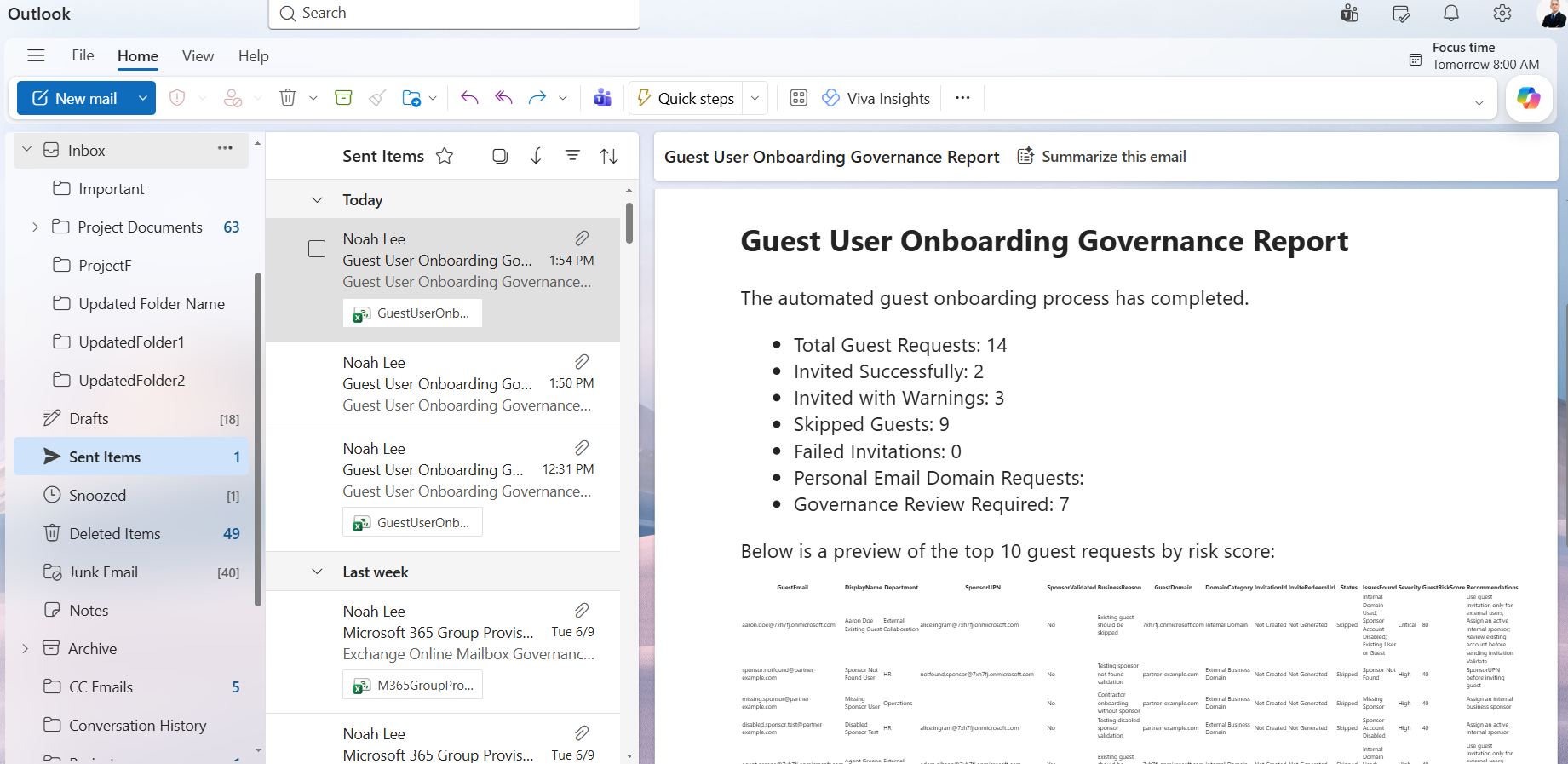

Sample Guest Onboarding Governance Report
Example output:
| GuestEmail | SponsorValidated | DomainCategory | Status | Severity | GuestRiskScore |
|---|---|---|---|---|---|
| vendor1@partner.com | Yes | External Business Domain | Invited Successfully | Low | 0 |
| consultant1@gmail.com | Yes | Personal Email Domain | Invited with Warnings | Medium | 20 |
| aaron.doe@7xh7fj.onmicrosoft.com | Yes | Internal Domain | Skipped | High | 40 |
| contractor1@vendor.com | No | External Business Domain | Skipped | Critical | 80 |
| partner1@external.com | Yes | External Business Domain | Invited with Warnings | Medium | 30 |
Understanding the Governance Report
| Column | Description |
|---|---|
| GuestEmail | External user email address |
| SponsorUPN | Business sponsor |
| SponsorValidated | Sponsor validation result |
| DomainCategory | Guest email classification |
| Status | Invitation outcome |
| Severity | Governance severity |
| GuestRiskScore | Risk score |
| Recommendations | Suggested remediation actions |
The GuestRiskScore and Severity values help administrators identify onboarding requests that require additional review before granting external access.
Why This Is Better Than Traditional Guest Invitation Scripts
Most guest invitation scripts simply:
- import a CSV
- send invitations
- report success or failure
This governance-focused approach additionally:
- validates sponsors
- validates business justification
- detects duplicate invitations
- identifies existing guests
- flags personal email domains
- generates governance recommendations
- produces auditable onboarding reports
This gives administrators governance visibility instead of just invitation status.
How the Script Works
- Connects to Microsoft Graph
- User.ReadWrite.All
- User.Invite.All
- validate users
- validate sponsors
- retrieve tenant domains
- invite guest users
- send governance reports
- Imports Guest Onboarding Requests
- Guest Email
- Display Name
- Department
- Sponsor UPN
- Business Reason
- Retrieves Verified Tenant Domains
- an internal domain
- an external business domain
- a personal email provider
- Detects Duplicate CSV Entries
- Validates Required Fields
- GuestEmail
- DisplayName
- SponsorUPN
- BusinessReason
- Validates Guest Email Addresses
- Detects Internal Domain Usage
- Detects Personal Email Domains
- Validates Sponsors
- sponsor exists
- sponsor account is enabled
- sponsor is not a guest account
- Detects Existing Guests and Users
- existing guest accounts
- existing users
- Calculates GuestRiskScore
- Severity Mapping
- Blocks High-Risk Requests
- Missing Guest Email
- Invalid Guest Email Format
- Missing Sponsor
- Sponsor Not Found
- Sponsor Account Disabled
- Guest Sponsor
- Internal Domain Used
- Existing User or Guest
- Sends Guest Invitations
- creates the guest invitation
- generates redemption URLs
- optionally sends invitation emails
- Generates Governance Reports
- onboarding outcomes
- governance findings
- severity
- risk score
- recommendations
- Emails Governance Summaries Automatically
- generates an HTML summary
- attaches the CSV report
- emails governance administrators
- total requests
- successful invitations
- skipped invitations
- personal email requests
- governance review candidates
The script connects to Microsoft Graph using:
Connect-MgGraph
with the following permissions:
Directory.Read.All
Mail.Send
These permissions allow the script to:
The script imports guest onboarding requests from a CSV file using:
Import-Csv
Each row represents a guest onboarding request.
The imported data includes:
This allows organizations to standardize guest onboarding processes.
The script retrieves verified Microsoft Entra domains using:
Get-MgDomain
These domains are later used to determine whether a guest email address belongs to:
This improves onboarding governance accuracy.
Before onboarding begins, the script checks for duplicate guest requests within the CSV.
If the same guest email appears multiple times:
Duplicate CSV Entry
is recorded.
The duplicate request is skipped and reported.
This prevents accidental duplicate onboarding requests.
The script validates:
Examples of validation failures:
Missing Guest Email
Missing Sponsor
Missing Business Justification
These issues increase the GuestRiskScore and may prevent onboarding.
The script validates email format using regular expressions.
Examples:
Valid:
user@partner.com
vendor@external.org
Invalid:
user
partner.com
Invalid email formats receive a significant governance penalty because invitations cannot be delivered successfully.
Guest onboarding should only be used for external users.
The script compares guest email domains against verified tenant domains.
Example:
employee@contoso.com
If an internal domain is detected:
Internal Domain Used
is recorded.
The invitation is skipped.
The script identifies common consumer email providers such as:
gmail.com
hotmail.com
outlook.com
yahoo.com
icloud.com
These invitations are not blocked, but receive additional governance risk points.
Organizations frequently require additional review before allowing personal email accounts access to business resources.
The script validates the business sponsor specified in:
SponsorUPN
using:
Get-MgUser
The validation confirms:
Possible outcomes include:
Sponsor Validated
Sponsor Not Found
Sponsor Account Disabled
Guest Sponsor
This ensures every guest onboarding request has accountable ownership.
Before invitations are sent, the script checks whether the guest already exists.
Using:
Get-MgUser
the script searches for:
If a match is found:
Existing User or Guest
is recorded.
The invitation is skipped to prevent duplicate guest onboarding.
The script assigns risk points based on governance concerns.
The higher the score, the greater the onboarding risk.
GuestRiskScore Criteria
Missing Guest Email
+40 Points
Reason:
A guest cannot be invited without a valid email address.
Missing Display Name
+20 Points
Reason:
Display names improve visibility and accountability.
Missing Sponsor
+40 Points
Reason:
Guest onboarding requires accountable ownership.
Missing Business Justification
+30 Points
Reason:
External access should have documented business justification.
Invalid Guest Email Format
+40 Points
Reason:
Invitation delivery will fail.
Internal Domain Used
+30 Points
Reason:
Guest invitations should not target internal users.
Personal Email Domain
+20 Points
Reason:
Consumer email addresses often require additional review.
Sponsor Account Disabled
+40 Points
Reason:
Disabled users should not sponsor external access.
Guest Sponsor
+30 Points
Reason:
Most organizations require internal accountability.
Sponsor Not Found
+40 Points
Reason:
Unverifiable sponsorship creates governance risk.
Existing User or Guest
+10 Points
Reason:
Duplicate onboarding should be reviewed before proceeding.
Duplicate CSV Entry
+20 Points
Reason:
Duplicate onboarding requests often indicate administrative mistakes.
GuestRiskScore Summary
| Governance Condition | Risk Points |
|---|---|
| Missing Guest Email | 40 |
| Missing Display Name | 20 |
| Missing Sponsor | 40 |
| Missing Business Justification | 30 |
| Invalid Guest Email Format | 40 |
| Internal Domain Used | 30 |
| Personal Email Domain | 20 |
| Sponsor Account Disabled | 40 |
| Guest Sponsor | 30 |
| Sponsor Not Found | 40 |
| Existing User or Guest | 10 |
| Duplicate CSV Entry | 20 |
The final GuestRiskScore represents the cumulative governance risk associated with the onboarding request.
The script converts GuestRiskScore values into severity levels.
| Risk Score | Severity |
|---|---|
| 0-19 | Low |
| 20-39 | Medium |
| 40-69 | High |
| 70+ | Critical |
Severity Definitions
| Severity | Meaning |
|---|---|
| Low | Governance requirements satisfied |
| Medium | Minor governance concerns exist |
| High | Significant review required |
| Critical | Immediate governance review required |
This helps administrators prioritize onboarding requests.
\The script automatically blocks onboarding when critical governance issues are detected.
Examples include:
This prevents non-compliant guest onboarding.
If validation succeeds, guest users are invited using:
New-MgInvitation
The script automatically:
to approved external users.
The script exports onboarding results using:
Export-Csv
The report includes:
This provides a complete audit trail.
The script automatically:
The summary includes:
This enables fully automated guest onboarding reviews.
Real-World Use Cases
- Vendor Onboarding
- Contractor Access Reviews
- Partner Collaboration
- Microsoft Teams External Collaboration
- Compliance and Audit Reviews
- Automating Guest Governance
- Azure Automation
- Windows Task Scheduler
- GitHub Actions
- Scheduled PowerShell Jobs
Validate vendor access requests before onboarding external users.
Ensure contractors have sponsors and documented business justification.
Automate external partner onboarding while maintaining governance controls.
Review guest onboarding requests before granting Teams access.
Generate onboarding audit reports for security and compliance teams.
This solution can be scheduled using:
allowing organizations to standardize guest onboarding reviews.
Possible Errors and Solutions
| Error | Cause | Solution |
|---|---|---|
| Insufficient privileges to complete the operation | Required Graph permissions are missing. | Reconnect using: Connect-MgGraph -Scopes ` "User.ReadWrite.All", "User.Invite.All", "Directory.Read.All", "Mail.Send" and grant admin consent. |
| Resource not found | Sponsor account cannot be located. | Verify the SponsorUPN value in the CSV file. |
| One or more added object references already exist | The guest already exists. | Review the existing guest account before inviting again. |
Conclusion
Inviting guest users is easy. Governing guest onboarding is where organizations gain long-term security and operational value.
This PowerShell automation solution helps organizations:
- validate guest onboarding requests
- enforce sponsor accountability
- document business justification
- identify risky invitations
- prevent duplicate onboarding
- automate governance reporting
By combining onboarding automation with governance controls, administrators can improve external collaboration while maintaining stronger Microsoft Entra security and compliance practices.