30-Day Disabled User License Reclaimer Using Graph PowerShell
In many Microsoft 365 environments, licenses are not always removed immediately when a user account is disabled. Sometimes accounts are temporarily disabled, placed on legal hold, or pending HR review. Immediately reclaiming licenses from every disabled account may not align with governance best practices.
A safer approach is: Reclaim licenses only if the account has remained disabled for 30 days or more. This guide demonstrates how to build a 30-day governance-based license reclaimer using Microsoft Graph PowerShell.
The script:
- ✔ Identifies disabled accounts
- ✔ Evaluates last sign-in activity
- ✔ Reclaims licenses only if inactive for 30+ days
- ✔ Skips recently disabled accounts
- ✔ Skips users with no licenses
- ✔ Exports a detailed audit report
This provides controlled, policy-driven license reclamation.
🚀 Community Edition Released!
Try the M365Corner Microsoft 365 Reporting Tool — your DIY pack with 20+ out-of-the-box M365 reports for Users, Groups, and Teams.
I) The Script
# Connect to Microsoft Graph
Connect-MgGraph -Scopes User.ReadWrite.All, Organization.Read.All, AuditLog.Read.All

Write-Host "Fetching disabled users..." -ForegroundColor Cyan

# Define threshold
$ThresholdDate = (Get-Date).AddDays(-30)

# Fetch disabled users with sign-in activity
$DisabledUsers = Get-MgUser -Filter "accountEnabled eq false" -All `
    -Property Id,UserPrincipalName,AssignedLicenses,SignInActivity

if (-not $DisabledUsers) {
    Write-Host "No disabled users found." -ForegroundColor Yellow
    break
}

$Results = @()

foreach ($User in $DisabledUsers) {

    try {

        # Determine last sign-in
        $LastSignIn = $User.SignInActivity.LastSignInDateTime

        if (-not $LastSignIn) {
            # If no sign-in activity exists, treat as eligible
            $EligibleForReclaim = $true
        }
        else {
            $EligibleForReclaim = ([datetime]$LastSignIn -lt $ThresholdDate)
        }

        if (-not $EligibleForReclaim) {

            Write-Host "$($User.UserPrincipalName) disabled less than 30 days. Skipping." -ForegroundColor Yellow

            $Results += [PSCustomObject]@{
                UserPrincipalName = $User.UserPrincipalName
                Status            = "Skipped - Disabled < 30 Days"
                Timestamp         = (Get-Date)
            }

            continue
        }

        # Get assigned licenses
        $AssignedSkuIds = $User.AssignedLicenses.SkuId

        if (-not $AssignedSkuIds) {

            Write-Host "$($User.UserPrincipalName) has no licenses. Skipping." -ForegroundColor Yellow

            $Results += [PSCustomObject]@{
                UserPrincipalName = $User.UserPrincipalName
                Status            = "Skipped - No Licenses"
                Timestamp         = (Get-Date)
            }

            continue
        }

        # Remove all assigned licenses
        Set-MgUserLicense -UserId $User.Id `
            -AddLicenses @() `
            -RemoveLicenses $AssignedSkuIds

        Write-Host "Licenses reclaimed from $($User.UserPrincipalName)" -ForegroundColor Green

        $Results += [PSCustomObject]@{
            UserPrincipalName = $User.UserPrincipalName
            LicensesRemoved   = ($AssignedSkuIds -join ", ")
            Status            = "Success"
            Timestamp         = (Get-Date)
        }

    }
    catch {

        Write-Host "Failed for $($User.UserPrincipalName)" -ForegroundColor Red
        Write-Host $_.Exception.Message

        $Results += [PSCustomObject]@{
            UserPrincipalName = $User.UserPrincipalName
            Status            = "Failed"
            ErrorMessage      = $_.Exception.Message
            Timestamp         = (Get-Date)
        }
    }
}

# Export Report
$ReportPath = "C:\Path\30DayDisabledLicenseReclaimReport.csv"
$Results | Export-Csv $ReportPath -NoTypeInformation

Write-Host "Report exported to $ReportPath" -ForegroundColor Cyan
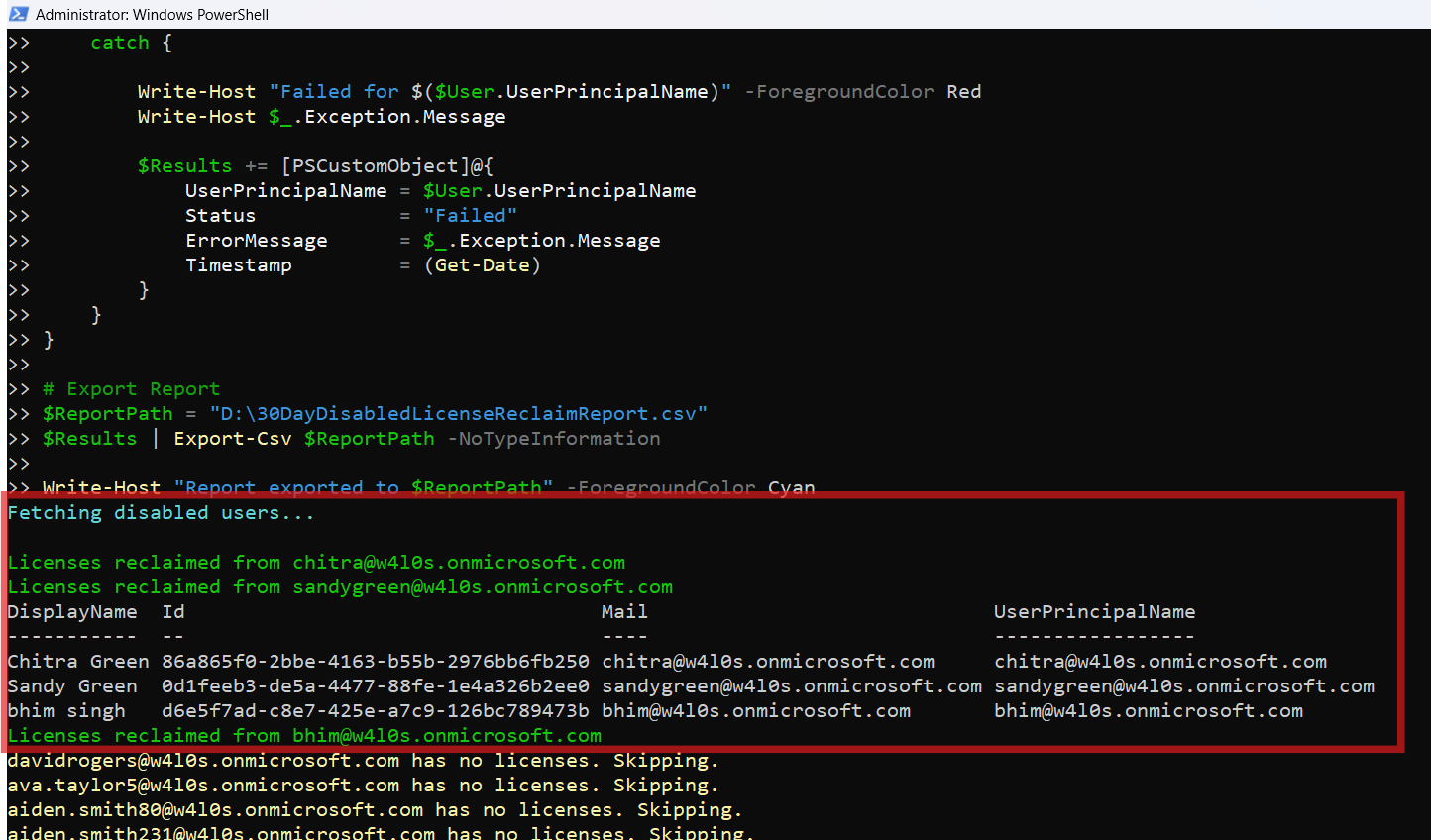
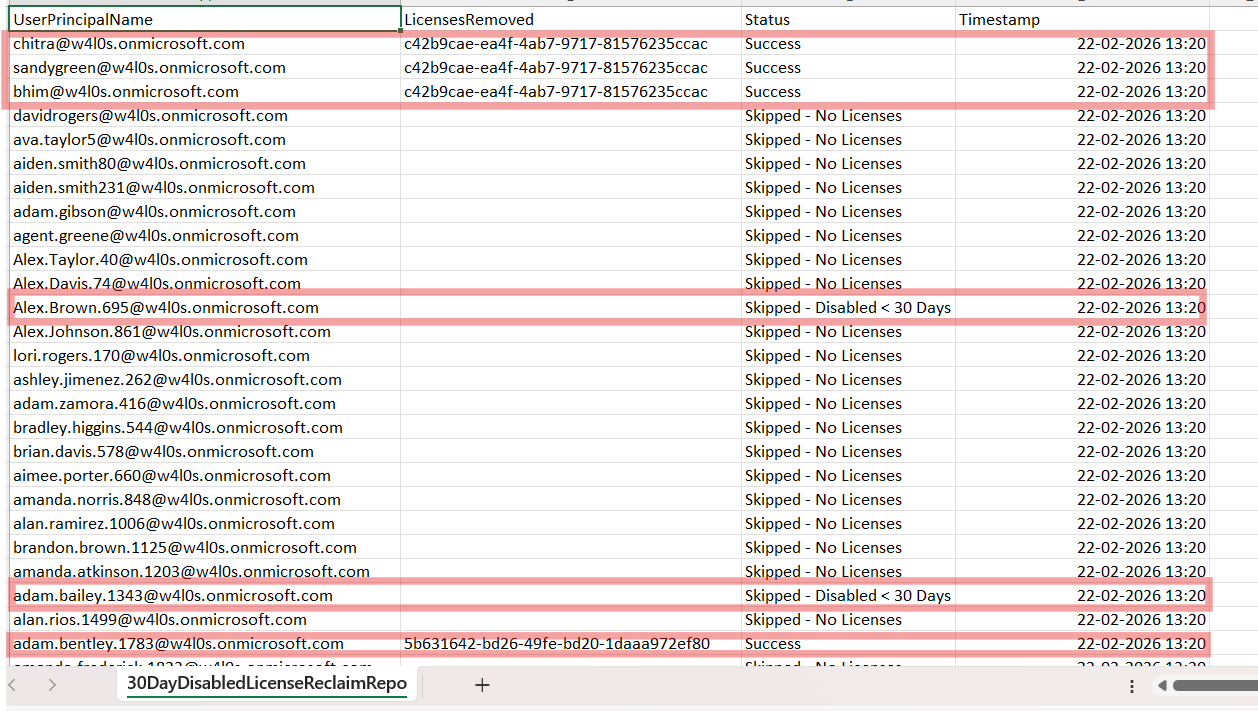
II) How the Script Works
- Establish 30-Day Governance Threshold
- Identify Disabled Users
- Evaluate Last Sign-In Activity
- If no sign-in activity exists → eligible
- If last sign-in older than 30 days → eligible
- If recent sign-in → skipped
- Remove All Assigned Licenses
$ThresholdDate = (Get-Date).AddDays(-30)Any last sign-in date older than this threshold is considered eligible.
Get-MgUser -Filter "accountEnabled eq false"Only accounts with:
AccountEnabled = Falseare processed.
$User.SignInActivity.LastSignInDateTimeThe logic is:
This prevents premature license removal.
Set-MgUserLicense `
  -AddLicenses @() `
  -RemoveLicenses $AssignedSkuIds
🔎 Important: -AddLicenses @() Is Mandatory
Even when removing licenses only.
If omitted, you may see:
Cannot convert the literal 'System.Collections.Hashtable' to the expected type 'Edm.Guid'Always include:
-AddLicenses @()Required Graph API Permissions
Scopes:
- User.ReadWrite.All
- Organization.Read.All
- AuditLog.Read.All
Role:
- Global Administrator
OR - License Administrator
III) Further Enhancements
This governance model can be extended to:
- Make threshold configurable (30 → 60 days)
- Exclude specific SKUs (e.g., free licenses)
- Calculate estimated cost savings
- Add simulation (WhatIf mode)
- Schedule via Azure Automation
- Send report via email
Each of these can become a dedicated governance-focused article.
IV) Possible Errors & Solutions
| Error | Cause | Solution |
|---|---|---|
| Insufficient Privileges | Required Graph scopes and roles have not been provided. | Ensure required Graph scopes and role are assigned. |
| SignInActivity Not Returned | AuditLog.Read.All scope is included within Graph API permissions. | Make sure AuditLog.Read.All scope is included. |
| No Eligible Users | No disabled users in the last 30 days. | Run Get-MgUser -All | Select UserPrincipalName,AccountEnabled to confirm. |
V) Conclusion
This governance-based script transforms license cleanup into a policy-driven process. Instead of: Immediate Cleanup → Risk. You implement: Controlled Threshold → Governance → Cost Optimization. For mature Microsoft 365 tenants, 30-day license reclamation aligns far better with operational policy and compliance standards.