Microsoft Entra Tenant
A Microsoft Entra tenant is the foundation of identity management in Microsoft cloud services such as Microsoft 365, Azure, and other SaaS applications. Every organization that uses Microsoft cloud services automatically receives a dedicated Entra tenant that stores its users, groups, applications, and security policies. Understanding the tenant concept helps administrators manage identities, access permissions, and cloud resources more effectively.
What is a Microsoft Entra Tenant?
A Microsoft Entra tenant is a dedicated instance of Microsoft Entra ID that represents an organization within Microsoft’s cloud.
It acts as a central identity directory where administrators manage:
- Users
- Groups
- Applications
- Devices
- Security policies
Each tenant is isolated from other organizations, ensuring that identities and resources remain secure.
Quick Example of a Microsoft Entra Tenant
When an organization signs up for Microsoft 365, Microsoft automatically creates a tenant.
Example:
Company: Contoso Ltd
Tenant domain: contoso.onmicrosoft.com
Within this tenant, administrators can create users such as:
- admin@contoso.com
- user1@contoso.com
- user2@contoso.com
All these identities belong to the same Entra tenant.
What is a Tenant ID?
Each Microsoft Entra tenant has a unique identifier called the Tenant ID.
The Tenant ID is a GUID (Globally Unique Identifier) used to identify the tenant in Microsoft services and APIs.
Example Tenant ID:
a1b2c3d4-5678-90ab-cdef-1234567890ab
Administrators often need the Tenant ID when:
- configuring applications
- using Microsoft Graph API
- setting up integrations
- running PowerShell scripts
How to Find Your Microsoft Entra Tenant ID
Administrators can find the Tenant ID in the Microsoft Entra Admin Center.
Steps:
- Go to https://entra.microsoft.com
- Select Microsoft Entra ID
- Open Overview
- Locate Tenant ID
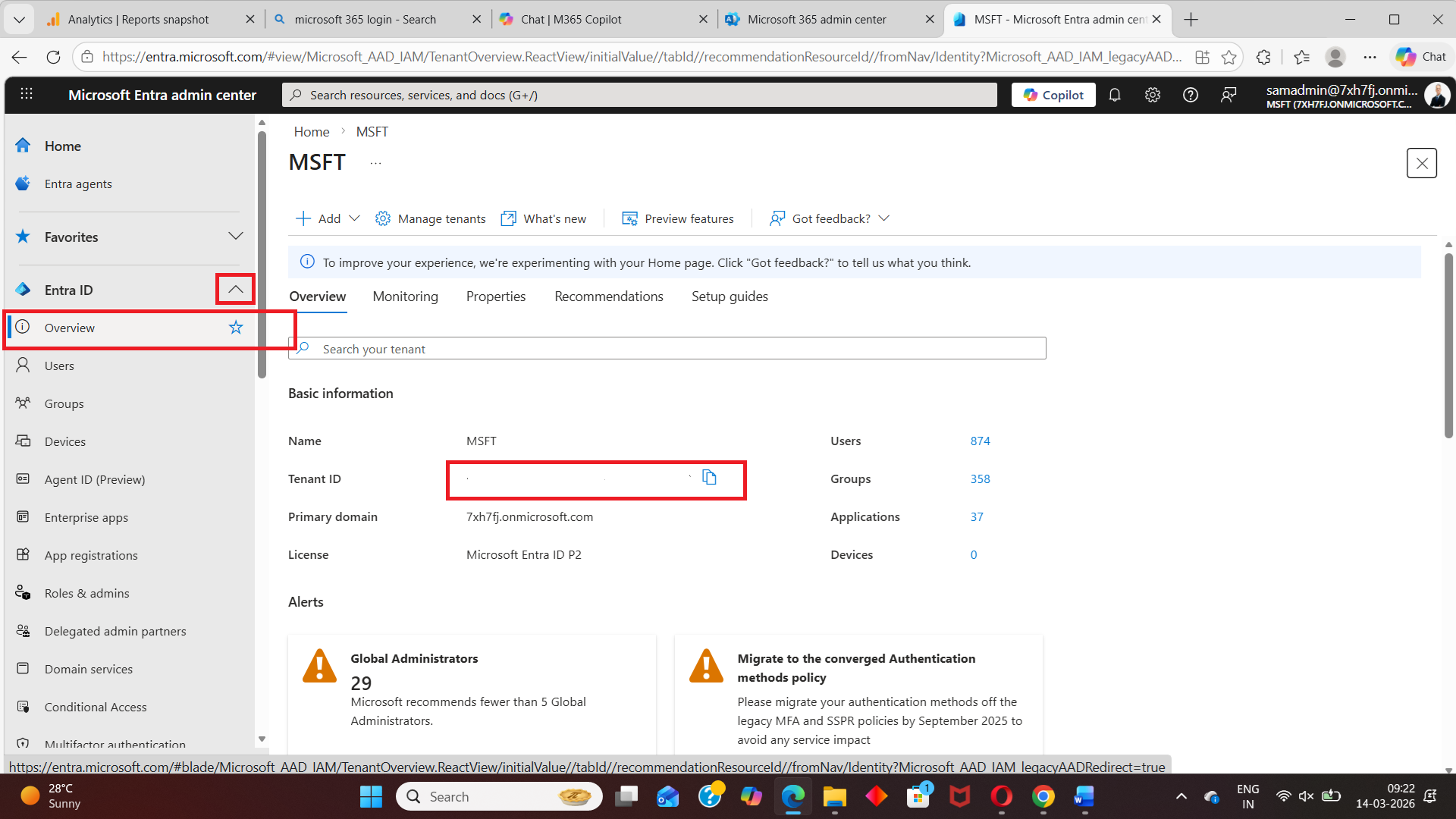
The overview page displays important tenant information including:
- Tenant name
- Primary domain
- Tenant ID
Understanding the Entra Tenant Directory Structure
A Microsoft Entra tenant functions as a directory containing identity objects.
The structure typically includes:
Tenant
│
├── Users
├── Groups
├── Applications
├── Devices
└── Roles
Users
Represents individuals who can access applications and services.
Groups
Used to manage permissions for multiple users.
Examples:
- Security groups
- Microsoft 365 groups
- Dynamic groups
Applications
Applications registered in the tenant for authentication and authorization.
Examples:
- Microsoft 365
- Salesforce
- Custom enterprise apps
Devices
Devices that are joined or registered in the tenant.
Examples:
- Windows devices
- Mobile devices
- Hybrid joined devices
Roles
Administrative permissions assigned to users.
Examples:
- Global Administrator
- User Administrator
- Security Administrator
Why Microsoft Entra Tenants Are Important
The tenant acts as the identity boundary for an organization.
It allows administrators to:
- Manage users and groups
- Secure access to applications
- Enforce authentication policies
- Control permissions and roles
Without a tenant, organizations cannot use Microsoft cloud identity services.
Can an Organization Have Multiple Entra Tenants?
Yes.
Large organizations sometimes use multiple tenants for reasons such as:
- mergers and acquisitions
- geographic separation
- testing environments
- business unit isolation
However, managing multiple tenants can increase administrative complexity.
Conclusion
A Microsoft Entra tenant is the identity foundation of Microsoft cloud services. It provides a secure directory where organizations manage users, applications, devices, and access policies.
Understanding how tenants work helps administrators effectively manage identity and access across Microsoft 365, Azure, and other integrated applications.
Did You Know? Managing Microsoft 365 applications is even easier with automation. Try our Graph PowerShell scripts to automate tasks like generating reports, cleaning up inactive Teams, or assigning licenses efficiently.
Ready to get the most out of Microsoft 365 tools? Explore our free Microsoft 365 administration tools to simplify your administrative tasks and boost productivity.