Microsoft Entra Admin Center Basics
The Microsoft Entra Admin Center is the primary portal used by administrators to manage identities, users, groups, applications, and security policies in Microsoft Entra ID.
Through this portal, administrators can perform tasks such as:
- Creating and managing users
- Managing groups and roles
- Configuring authentication and security policies
- Viewing audit and sign-in logs
Understanding how to access the Microsoft Entra Admin Center is one of the first steps for managing identity in Microsoft cloud services.
What is the Microsoft Entra Admin Center?
The Microsoft Entra Admin Center is a web-based management portal used to administer Microsoft Entra ID.
Administrators use this portal to manage:
- Users
- Groups
- Applications
- Devices
- Roles and permissions
- Security policies
It replaces many identity management functions that were previously managed through the Azure portal.
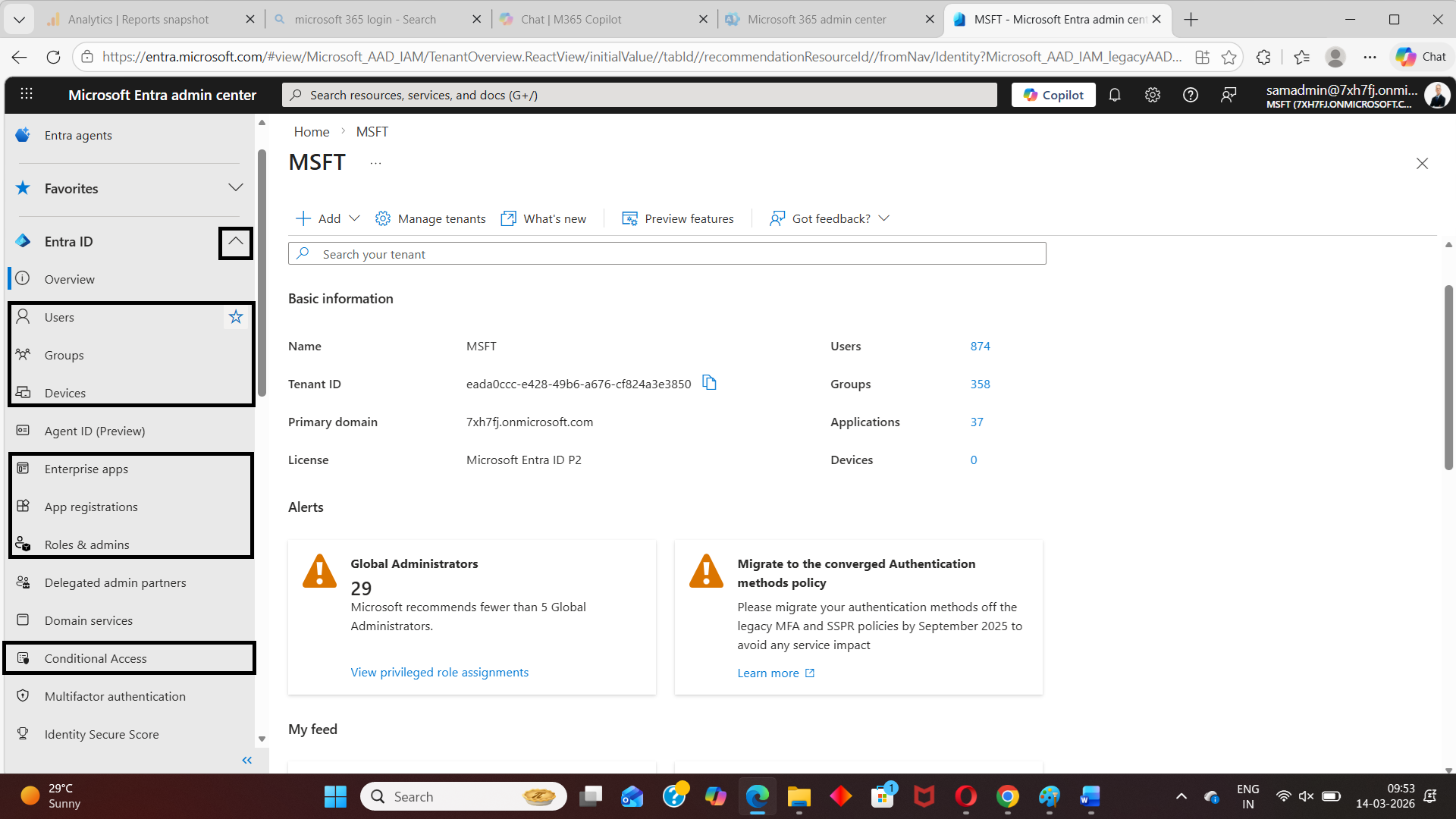
How to Access the Microsoft Entra Admin Center
Follow these steps to access the portal.
| Step | Action |
|---|---|
| Step 1 | Open the Microsoft Entra Admin Center. https://entra.microsoft.com |
| Step 2 | Sign in using an administrator account. Examples:
|
| Step 3 | After signing in, you will see the Microsoft Entra Admin Center dashboard. From the left navigation menu, you can manage:
|
Key Sections of the Entra Admin Center
| Section | Purpose |
|---|---|
| Microsoft Entra ID | Main directory where administrators manage users, groups, roles, and identity settings |
| Applications | Manage enterprise applications, app registrations, and application permissions |
| Protection | Configure security features such as Conditional Access, Identity Protection, and authentication methods |
| Monitoring | View identity activity including sign-in logs, audit logs, and risk detections |
| Devices | Manage devices joined or registered with Microsoft Entra ID |
Who Can Access the Entra Admin Center?
Access depends on directory roles.
Common roles that can access the portal include:
| Role | Access Level |
|---|---|
| Global Administrator | Full access |
| User Administrator | Manage users |
| Security Administrator | Manage security policies |
Users without administrative roles may not have access to many management features.
When Administrators Use the Entra Admin Center
Administrators commonly use the portal for:
- Creating and managing users
- Resetting passwords
- Assigning licenses
- Managing groups
- Configuring MFA and Conditional Access
- Reviewing sign-in and audit logs
Conclusion
The Microsoft Entra Admin Center is the central portal for managing identity and access in Microsoft cloud environments. By accessing https://entra.microsoft.com, administrators can manage users, groups, roles, applications, and security policies from a single interface.
Did You Know? Managing Microsoft 365 applications is even easier with automation. Try our Graph PowerShell scripts to automate tasks like generating reports, cleaning up inactive Teams, or assigning licenses efficiently.
Ready to get the most out of Microsoft 365 tools? Explore our free Microsoft 365 administration tools to simplify your administrative tasks and boost productivity.