🔧 New: User Management Graph PowerShell Toolkit
Simplify user tasks like bulk creation, updates, password resets, deletions, license checks & more — all from one place.
🚀 Launch ToolkitMicrosoft 365 Free Reporting Tool — Group Owners Report
Microsoft 365 groups power collaboration across Outlook, Teams, SharePoint, Planner, and more. But every group needs accountability — and that responsibility lies with group owners.
The challenge?
Microsoft 365 doesn’t give admins an easy, centralized way to see who owns what.
That’s where the Microsoft 365 Group Owners Report, available in the M365 Free Reporting Tool (also known as the Microsoft 365 free community dashboard or Free M365 Community Dashboard), becomes invaluable.
Who Are Microsoft 365 Group Owners?
Microsoft 365 group owners are users responsible for managing a group. They can:
- Add or remove members
- Update group settings
- Manage access to group resources
- Own governance responsibilities for the group
Every Microsoft 365 group should ideally have at least one active owner. Groups without owners can quickly become unmanaged, insecure, or abandoned.
Why Generate Microsoft 365 Group Owners Report?
A Group Owners Report gives admins immediate visibility into group accountability.
- ✔ Identify groups without owners
- ✔ Support governance and compliance
- ✔ Reduce operational risks
- ✔ Simplify admin communication
Unowned groups are risky and should be addressed immediately.
Auditors often ask who owns access to shared resources.
Knowing owners helps route approvals, changes, and clean-up actions correctly.
Quickly contact the right owners during incidents or policy changes.
Without a consolidated report, this information is scattered and difficult to track.
How to Generate Microsoft 365 Group Owners Report?
Admins can rely on one of three methods. Let’s look at each.
- Using Microsoft 365 Admin Center
- Open each Microsoft 365 group individually
- Navigate to the Owners tab
- Note the assigned users
- Repeat this process for every group
- Extremely time-consuming
- No bulk visibility
- No export option
- Not feasible in large tenants
- Using Graph PowerShell
- Requires Graph and PowerShell knowledge
- Multiple API calls per group
- Error handling and pagination required
- Manual formatting and export steps
- Not ideal for quick or repeated reporting
- Using M365Corner Microsoft 365 Free Reporting Tool
- No scripts required
- No Admin Center hopping
- Instant visibility across all groups
- Clear mapping of group → owners
- One-click CSV export
- Send report as mail option
The Microsoft 365 Admin Center does not offer a global “Group Owners” view.
To find owners, admins must:
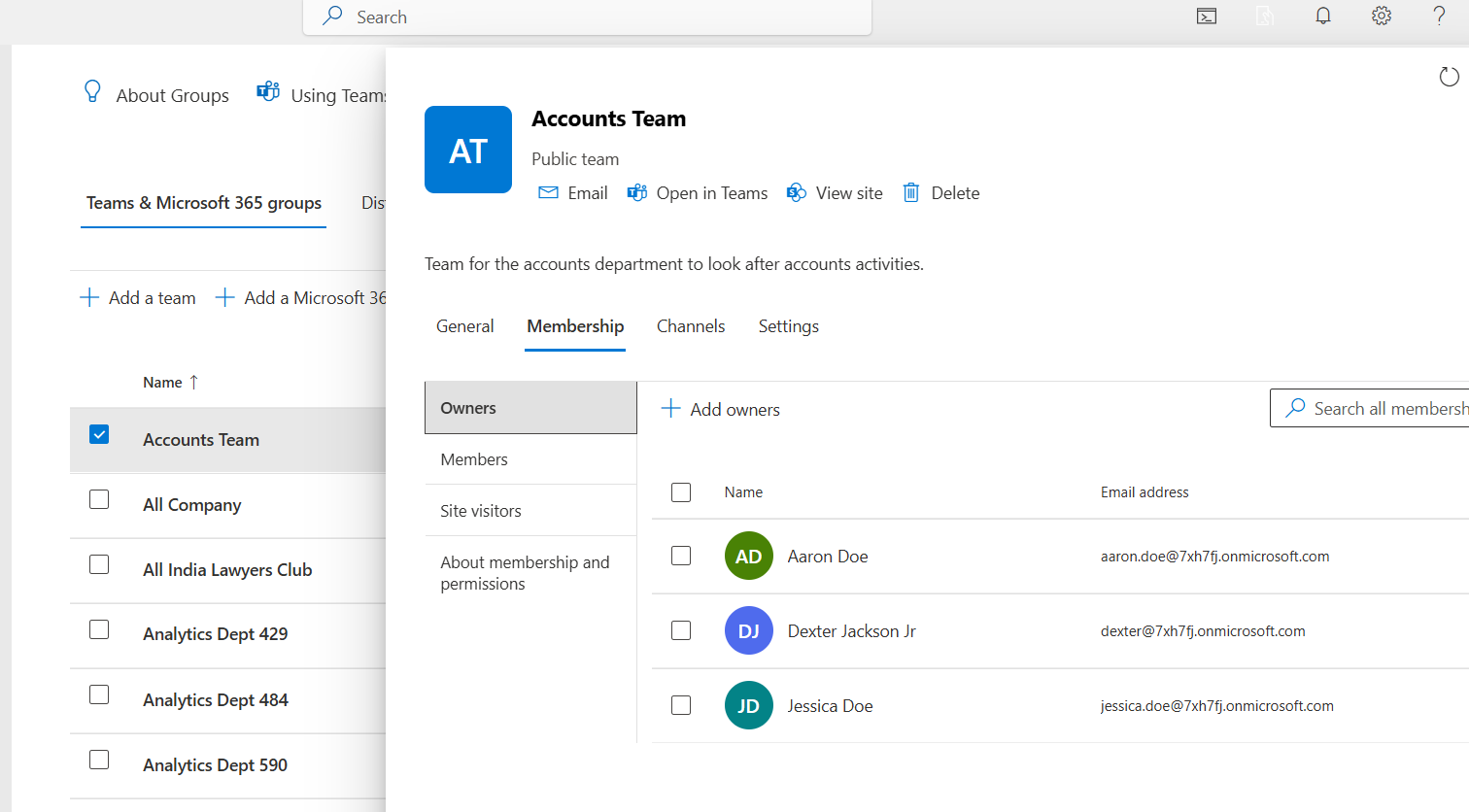
❌ Drawbacks
Graph PowerShell allows you to extract group owner information programmatically — but it requires scripting expertise and careful handling.
Sample Graph PowerShell Script
(As demonstrated here:
https://m365corner.com/m365-powershell/email-m365-group-owners-report-graph-powershell.html)
# Connect to Microsoft Graph
Connect-MgGraph -Scopes "Group.Read.All", "User.Read.All", "Mail.Send"

# Define admin mailbox to send report
$adminEmail = "samadmin@7xh7fj.onmicrosoft.com"  # Replace with your actual admin email
$fromUser = "samadmin@7xh7fj.onmicrosoft.com"    # The mailbox from which the email will be sent

# Fetch all Unified Groups
$groups = Get-MgGroup -All -Property Id, DisplayName, GroupTypes | Where-Object {
    $_.GroupTypes -contains "Unified"
}

Write-Host "Found $($groups.Count) unified groups. Collecting owners..." -ForegroundColor Cyan
⚠️ Downsides of PowerShell
For many admins, this approach is powerful — but unnecessarily complex for a routine report.
With the M365Corner Microsoft 365 Free Reporting Tool, generating a Microsoft 365 Group Owners Report is effortless.
👉 You can generate the Group Owners Report at the click of a button.
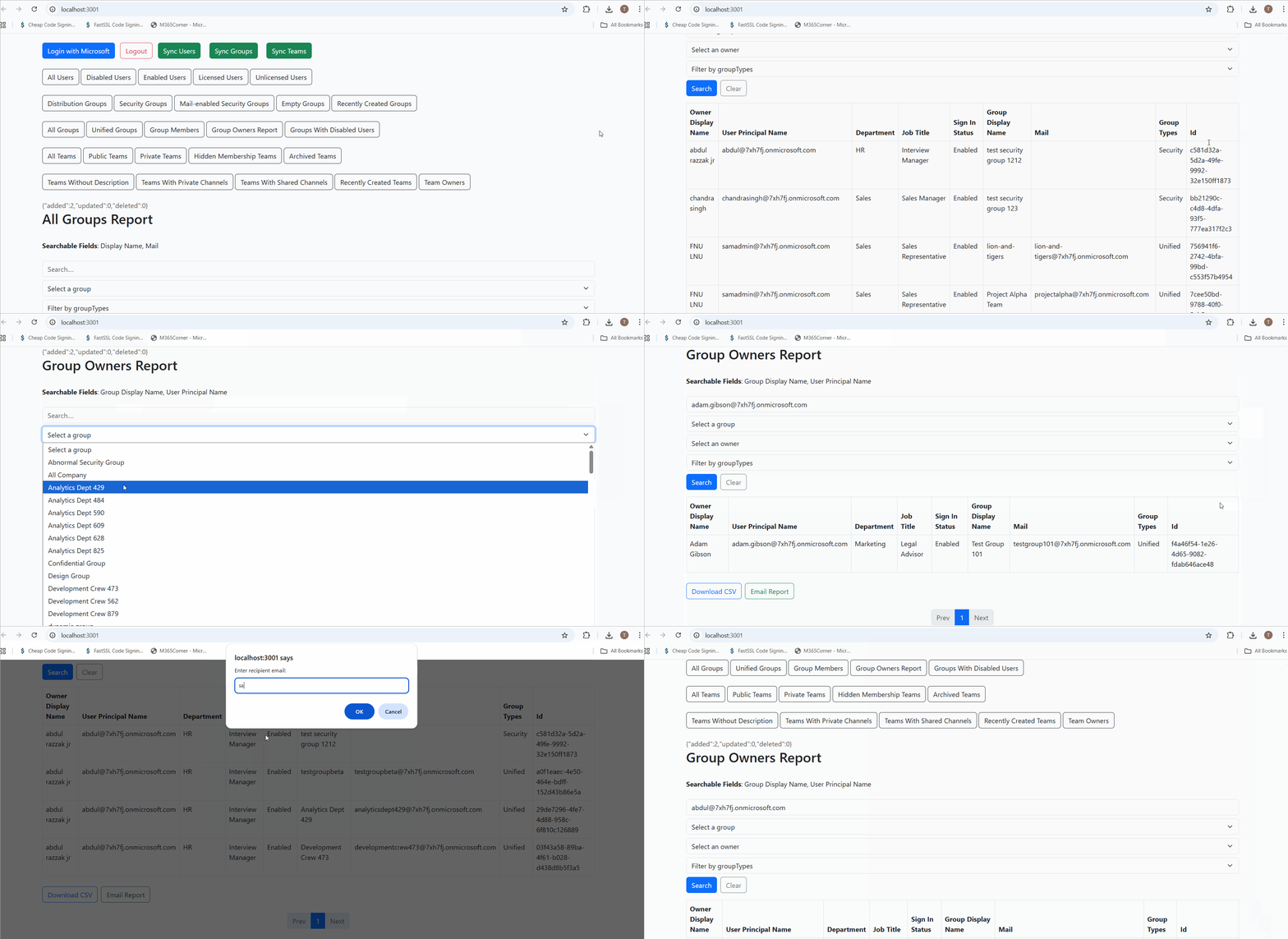
Why this helps admins
This approach dramatically reduces effort, giving admins instant clarity into ownership and governance gaps across the tenant.
Call to Action — Explore Group Owners Report
- Learn More About Group Owners Report https://m365corner.com/m365-free-tools/microsoft-365-group-owners-report.html
- Explore All Reports in the M365 Free Reporting Tool https://m365corner.com/m365-free-tools/m365corner-reporting-tool.html
- Download the Community Edition https://github.com/m365corner/m365corner-reporting-tool-community-edition.git
Understand what the report shows and how it supports Microsoft 365 governance.
Discover all reports available in the Microsoft 365 free community dashboard.
Get started today with the Free M365 Community Dashboard.
The M365 Free Reporting Tool removes complexity from Microsoft 365 reporting and gives admins what they need most — clarity, speed, and control.
Did You Know? Managing Microsoft 365 applications is even easier with automation. Try our Graph PowerShell scripts to automate tasks like generating reports, cleaning up inactive Teams, or assigning licenses efficiently.
Ready to get the most out of Microsoft 365 tools? Explore our free Microsoft 365 administration tools to simplify your administrative tasks and boost productivity.